Your workflow is unique 👨💻 - tell us how you use Dropbox here.
Forum Discussion

akane13
7 months agoNew member | Level 2
Cloud icon on files even with offline sync selected in the Dropbox desktop app on Windows 10
Hello
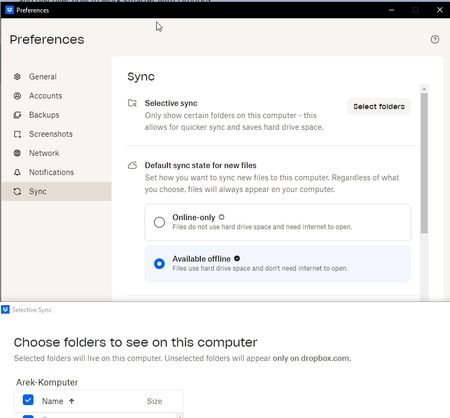
I have a cloud icon on Dropbox files until I click them. Because of that my files are unavailable offline. Files were uploaded from another device, I opened Dropbox app and when back offl...
- 7 months ago
Hey akane13 - thanks for using Dropbox and welcome to the Community!
The setting you're showing in your screenshot will be applied to new files you add not already existing ones.
In this case, you need to simply right click on the files that have the online-only icon on them and mark them to be available offline on your computer.
I hope this helps!


akane13
7 months agoNew member | Level 2
Hey Walter and thank you for your help!
I had these settings applied previously but it seems the issue existed only for one folder and your suggestion to right click and mark it as offline helped. What I find weird though is that this folder was already checked in Selective sync list.
Anyway my issue is resolved now, thanks!

About Create, upload, and share
Find help to solve issues with creating, uploading, and sharing files and folders in Dropbox. Get support and advice from the Dropbox Community.
The Dropbox Community team is active from Monday to Friday. We try to respond to you as soon as we can, usually within 2 hours.
If you need more help you can view your support options (expected response time for an email or ticket is 24 hours), or contact us on X, Facebook or Instagram.
For more info on available support options for your Dropbox plan, see this article.
If you found the answer to your question in this Community thread, please 'like' the post to say thanks and to let us know it was useful!


