Your workflow is unique 👨💻 - tell us how you use Dropbox here.
Forum Discussion

plshalp
4 years agoExplorer | Level 4
"copy dropbox link" missing or replaced with "send with transfer"?
The main thing I use Dropbox for "copy dropbox link" is no longer appearing when I right click on a file in Windows Explorer. I've tried what all the other "missing copy dropbox link" articles have...

Rich Super User II
4 years agoSuper User II
plshalp wrote:
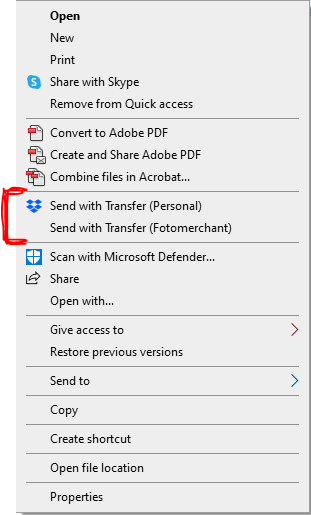
The dropbox app is working because it is giving me the option to send with transfer, but it isn't giving me the option to Copy Dropbox Link.
Where is the file located? The Copy Dropbox link option is only available when you right-click on a file or folder located within your Dropbox folder. Clicking on files located elsewhere on your computer will only offer the Send with Transfer option.
 plshalp4 years agoExplorer | Level 4
It is in Dropbox.
One thing that has changed since last week is I now have a work dropbox - so my regular dropbox has become my "personal" dropbox.
I've actually just found that using one quick access folder link (in Windows Explorer) vs a different quick access link changes what Dropbox options appear as options.
If I chose my "timesheets" Quick Access folder link, I get my normal Dropbox menu including copy dropbox link, but...
If I chose the "stocklist" Quick Access folder link which I normally use. I only get transfer options - EVEN IF I then navigate over to the timesheets folder which works normally when I accessed via the "timesheets" Quick Access folder link.
About Create, Upload, and Share
Find help to solve issues with creating, uploading, and sharing files and folders with Dropbox.
The Dropbox Community team is active from Monday to Friday. We try to respond to you as soon as we can, usually within 2 hours.
If you need more help you can view your support options (expected response time for an email or ticket is 24 hours), or contact us on X, Facebook or Instagram.
For more info on available support options for your Dropbox plan, see this article.
If you found the answer to your question in this Community thread, please 'like' the post to say thanks and to let us know it was useful!


