Your workflow is unique 👨💻 - tell us how you use Dropbox here.
Forum Discussion

plshalp
4 years agoExplorer | Level 4
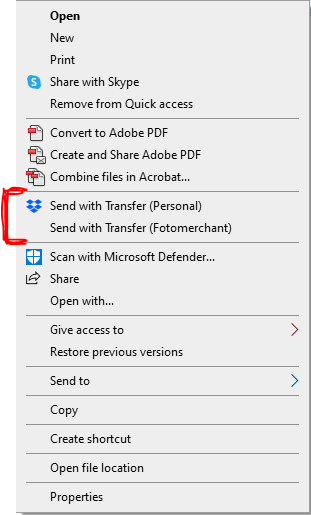
"copy dropbox link" missing or replaced with "send with transfer"?
The main thing I use Dropbox for "copy dropbox link" is no longer appearing when I right click on a file in Windows Explorer. I've tried what all the other "missing copy dropbox link" articles have...

Megan Dropbox Community Moderator
4 years agoDropbox Community ModeratorHi plshalp, I hope you're doing well!
Would you mind telling me the status of your Dropbox desktop application and its version too?
Also, when the option isn't apparent, do you use your work or personal account?
Let me know, and we'll take it from there.
Would you mind telling me the status of your Dropbox desktop application and its version too?
Also, when the option isn't apparent, do you use your work or personal account?
Let me know, and we'll take it from there.

plshalp
4 years agoExplorer | Level 4
My dropbox is fully synced except for 3 files (obviously not the ones I am trying to copy a link for).
v128.4.2870
It looks like it only does the weird thing when I use certain quick folder links in explorer.
If I access the files from a different location via explorer, and I can copy the link, but if I use the quick folder link I can't get the 'copy dropbox link' at all... even if I go to a file I was able to do this for moments ago.
Seems like it's just a weird bug.
For now I've got a workaround which is sufficient to get by with.
- Jay4 years agoHi plshalp, this can happen with Quick Access links, and they might redirect to different locations.
In general, if you're directly navigating to the folder in the Dropbox folder itself, it should contain all the context menus when you right click.
Are you able to see the sync icons when you view files via the Quick access link?
I'm happy to hear you've found a workaround to this matter. Who Fan3 years agoNew member | Level 2
The quick access links in Windows 10 used to allow the option of right-click "Copy Dropbox link" because I too always used that. Now you have to navigate to the folder direct, not using quick access. It means having to go through multiple file trees to get to the folder that is right there in quick access in explorer. Why did that change to only the "send with transfer" which is almost never helpful?

About Create, Upload, and Share
Find help to solve issues with creating, uploading, and sharing files and folders with Dropbox.
The Dropbox Community team is active from Monday to Friday. We try to respond to you as soon as we can, usually within 2 hours.
If you need more help you can view your support options (expected response time for an email or ticket is 24 hours), or contact us on X, Facebook or Instagram.
For more info on available support options for your Dropbox plan, see this article.
If you found the answer to your question in this Community thread, please 'like' the post to say thanks and to let us know it was useful!


