Your workflow is unique 👨💻 - tell us how you use Dropbox here.
Forum Discussion

David125
3 years agoHelpful | Level 6
Copy Link button creates edit link, not a view link. It used to be different.
Couple weeks or months ago, when you click on Copy Link, while browsing in your folders, it created view link (/sh/), now it creates access link (/scl/) which creates issues and confusion with our ex...

RichardJTAG
1 year agoNew member | Level 2
I'm having exactly this problem and it's infuriating, I can't even find the "viewing" link after creating one, every option seems to recreate an "editing" link.

Hannah Dropbox Community Moderator
1 year agoDropbox Community ModeratorSorry to hear that you're having trouble creating a "can view" link, RichardJTAG.
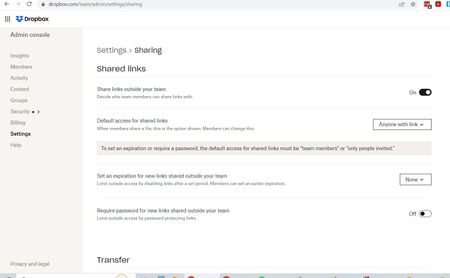
Do these steps help?
- RichardJTAG1 year agoNew member | Level 2
Yes, thank you! I did get there in the end, it's just that when you're working in the folder itself the options for creating a link all seem to default to an editing link, and although you can switch it to a viewing link in a pop up window the window doesn't actually let you see or copy the viewing link you've just created which is weird.
- Hannah1 year ago
I understand where you're coming from, Richard.
I'll make sure to pass your feedback along to the team and I'm glad you were able to get to the bottom of this after all.
If you need anything else, let us know!
About Create, Upload, and Share
Find help to solve issues with creating, uploading, and sharing files and folders with Dropbox.
The Dropbox Community team is active from Monday to Friday. We try to respond to you as soon as we can, usually within 2 hours.
If you need more help you can view your support options (expected response time for an email or ticket is 24 hours), or contact us on X, Facebook or Instagram.
For more info on available support options for your Dropbox plan, see this article.
If you found the answer to your question in this Community thread, please 'like' the post to say thanks and to let us know it was useful!


