We're making some changes to the Dropbox Community 👩💻 - Find out more here.
Forum Discussion

frank479
6 months agoHelpful | Level 5
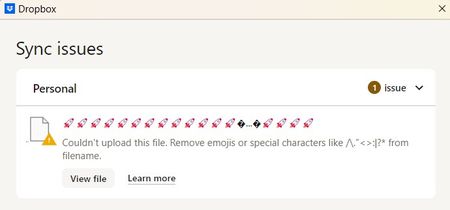
Desktop app shows a "couldn't upload this file" error but I can't find the file
Device Dell Alienware Operating System/Browser (if using the web) Windows 11 Dropbox App Version (if using the app) 230.4.8797 Syncing Status Sync issue with 1 file
Question or Issue D...
- 6 months ago
Hey frank479, let's try something.
Can you try signing out of the app, and then signing back in? Do you notice the same behavior after trying this?


frank479
6 months agoHelpful | Level 5
Well the vast majority of those suggestions assume you have this file but it's jut not syncing but that's not my situation. Personally, I don't think there's a file. I think something internal is corrupted with Dropbox. I did run sfc on my C drive (Dropbox is on my E drive but since it was opening up my desktop folder... might as well run it there): "Windows Resource Protection did not find any integrity violations." I then ran chkdsk /r on my SSD where Dropbox resides: "Windows has scanned the file system and found no problems." And I did search the entire SSD for that rocket symbol. Nothing. I checked another computer I have and there are no sync issues. Which tells me that the files Dropbox SHOULD be syncing within the Dropbox folder are ok (both are offline available). So, what's different with this computer? Does Dropbox have a debug mode? Are there cache's or temporary data I can delete? Do I need to reinstall Dropbox and clean up any of its residual data? Any other ideas? Those rockets I see displayed... was that the full path to the file or just a filename? What does it normally show on that line?


About Create, Upload, and Share
Find help to solve issues with creating, uploading, and sharing files and folders with Dropbox.
The Dropbox Community team is active from Monday to Friday. We try to respond to you as soon as we can, usually within 2 hours.
If you need more help you can view your support options (expected response time for an email or ticket is 24 hours), or contact us on X, Facebook or Instagram.
For more info on available support options for your Dropbox plan, see this article.
If you found the answer to your question in this Community thread, please 'like' the post to say thanks and to let us know it was useful!


