We're making some changes to the Dropbox Community 👩💻 - Find out more here.
Forum Discussion

frank479
6 months agoHelpful | Level 5
Desktop app shows a "couldn't upload this file" error but I can't find the file
Device Dell Alienware Operating System/Browser (if using the web) Windows 11 Dropbox App Version (if using the app) 230.4.8797 Syncing Status Sync issue with 1 file
Question or Issue D...
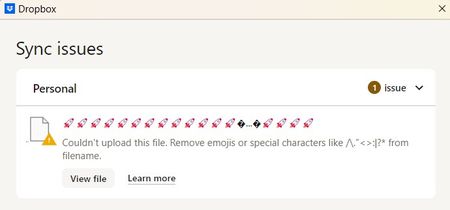
- 6 months ago
Hey frank479, let's try something.
Can you try signing out of the app, and then signing back in? Do you notice the same behavior after trying this?


Theresa Community Manager
6 months agoCommunity ManagerHi there frank479 and welcome back to the Dropbox Community. I’m really glad to hear things are working properly again and thank you so much for coming back to update us 🤗. It’s always helpful when someone takes the time to share what worked, especially with tricky upload errors like this (even if it may seem simple a log in and out really does the trick sometimes 😉)
By the way, I’m Theresa 👩💻, one of the community managers here at Dropbox HQ. Since you’ve been working through this on the desktop app, I’d love to know... how do you usually use Dropbox in your day to day? Whether it’s for personal projects, work, or something in between, I’m always curious to hear how people make Dropbox fit into their routines.
Looking forward to hearing more,
T 😺 (Dropbox Community Manager)

frank479
6 months agoHelpful | Level 5
I use Dropbox probably like most people. I have a single HD with all my data (personal projects mostly) that I sync to the cloud. It's nice to know my data is safely backed up all the time. I have lots of pictures, videos, coding projects, e-books, language learning lessons, etc. And being able to access it from my mobile devices is key. Many of the apps I use work with DB so I like the seamless integration across all platforms.
About Create, Upload, and Share
Find help to solve issues with creating, uploading, and sharing files and folders with Dropbox.
The Dropbox Community team is active from Monday to Friday. We try to respond to you as soon as we can, usually within 2 hours.
If you need more help you can view your support options (expected response time for an email or ticket is 24 hours), or contact us on X, Facebook or Instagram.
For more info on available support options for your Dropbox plan, see this article.
If you found the answer to your question in this Community thread, please 'like' the post to say thanks and to let us know it was useful!


