Need to see if your shared folder is taking up space on your dropbox 👨💻? Find out how to check here.
Forum Discussion

ivandeki
4 years agoExplorer | Level 4
Dropbox files no longer properly syncing?
Hi all,
Since the new Dropbox desktop app, I'm struggling with the following.
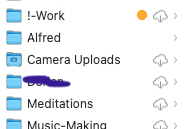
Although the app seems to think it's in sync, I'm seeing lots of "cloud download" icons on my folders and files, wh...


Walter Dropbox Community Moderator
4 years agoDropbox Community ModeratorHey ivandeki, welcome to our Community and thanks for using Dropbox!
If you've ensured that the Dropbox desktop app is 'up to date' and not still syncing in your menu bar/task bar, can you see if you get the option to make them available offline when you right click on them?
Let me know and we'll take it from there.
 ivandeki4 years agoExplorer | Level 4
hi Walter, thanks for the reply. I indeed just discovered that if I do that the problem is solved.
I don't understand why I needed to do this. In the past, this seemed to be the default setting?
- Walter4 years ago
It seems that you're on the updated desktop app for Mac OS, so from now on you can use Make online-only and Make available offline actions when syncing your files and folders.
Let us know if you have any other questions ivandeki
- ivandeki4 years agoExplorer | Level 4
Is there a way to set this for my entire Dropbox? Or I have to do it for each top level folder?
About Create, upload, and share
Find help to solve issues with creating, uploading, and sharing files and folders in Dropbox. Get support and advice from the Dropbox Community.
The Dropbox Community team is active from Monday to Friday. We try to respond to you as soon as we can, usually within 2 hours.
If you need more help you can view your support options (expected response time for an email or ticket is 24 hours), or contact us on X, Facebook or Instagram.
For more info on available support options for your Dropbox plan, see this article.
If you found the answer to your question in this Community thread, please 'like' the post to say thanks and to let us know it was useful!


