We're making some changes to the Dropbox Community 👩💻 - Find out more here.
Forum Discussion

Kasyan
2 hours agoNew member | Level 2
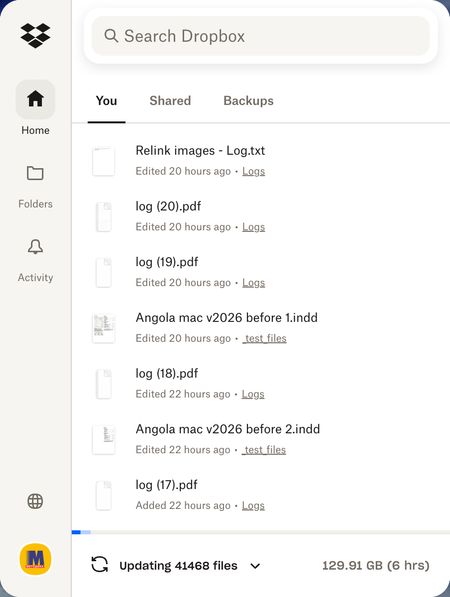
Dropbox is unnecessarily updating 40,000 files
Device iMac, 3,3 GHz 6-Core Intel Core i5, 8 GB 2667 MHz DDR4, Operating System/Browser (if using the web) Tahoe 26.3.1 Dropbox App Version The latest Problem Just out of a sudden, with no obv...

Walter Dropbox Community Moderator
2 hours agoDropbox Community ModeratorHi there Kasyan - sorry to hear you're having issues with this.
Just to clarify, what's preventing you from working on the files that are being updated? Are you getting any particular errors when trying to open or edit them perhaps?
Also, did you rename or move any files or folders by accident while the Dropbox desktop app wasn't syncing and it's just syncing the changes now?
Have you tried rebooting your computer and quitting and relaunching the app since you first noticed this by the way?
Let me know more and we'll take it from there.
About Create, Upload, and Share
Find help to solve issues with creating, uploading, and sharing files and folders with Dropbox.
The Dropbox Community team is active from Monday to Friday. We try to respond to you as soon as we can, usually within 2 hours.
If you need more help you can view your support options (expected response time for an email or ticket is 24 hours), or contact us on X, Facebook or Instagram.
For more info on available support options for your Dropbox plan, see this article.
If you found the answer to your question in this Community thread, please 'like' the post to say thanks and to let us know it was useful!


