We're making some changes to the Dropbox Community 👩💻 - Find out more here.
Forum Discussion

Kasyan
2 hours agoNew member | Level 2
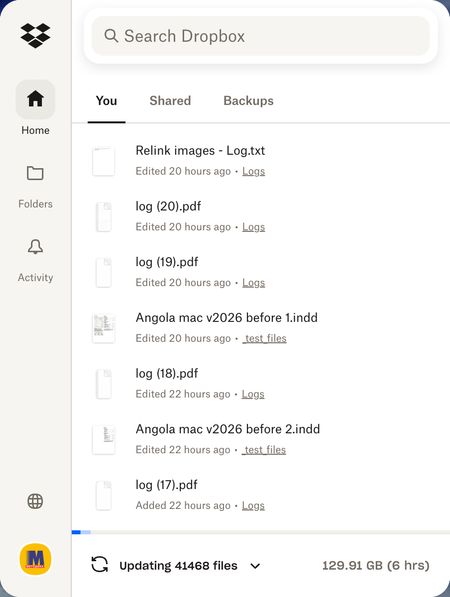
Dropbox is unnecessarily updating 40,000 files
Device iMac, 3,3 GHz 6-Core Intel Core i5, 8 GB 2667 MHz DDR4, Operating System/Browser (if using the web) Tahoe 26.3.1 Dropbox App Version The latest Problem Just out of a sudden, with no obv...

Kasyan
1 hour agoNew member | Level 2
Hello Walter !
I'm working on two computers simultaneously: Mac and Windows.
I'm testing scripts for Adobe InDesign — jsx-files — on both platforms. Also, a few test files are involved: InDesign docs, jpeg images, screenshots, etc., which are not heavy.
I see the recent files are being updated though I didn't change them.
I can't see which files are updated and where: there are no blue icons next to folder & file names.
No, I didn't rename/move folders/files.
I rebooted the computer and updating restarted again. The process gobbled almost all free space on the hard drive. Then I selected all the folders and chose 'Make online-only'. In a while, this solved my problem. Update was complete and available space was restored.
I will reload what I need later.


About Create, Upload, and Share
Find help to solve issues with creating, uploading, and sharing files and folders with Dropbox.
The Dropbox Community team is active from Monday to Friday. We try to respond to you as soon as we can, usually within 2 hours.
If you need more help you can view your support options (expected response time for an email or ticket is 24 hours), or contact us on X, Facebook or Instagram.
For more info on available support options for your Dropbox plan, see this article.
If you found the answer to your question in this Community thread, please 'like' the post to say thanks and to let us know it was useful!


