We're making some changes to the Dropbox Community 👩💻 - Find out more here.
Forum Discussion

hdb2
5 hours agoExplorer | Level 3
Dropbox keeps syncing my files as online-only despite my app preferences (on macOS Tahoe 26.3).
Hello Dropbox!
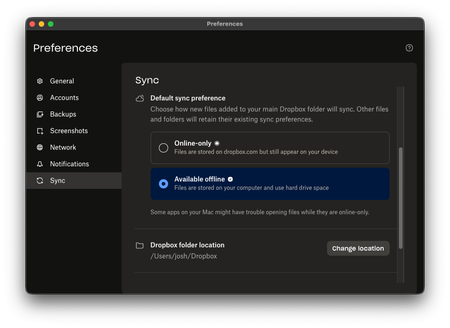
I am running the latest Dropbox on MacOS Tahoe v26.3 (not a new install). As you can see, I have always had my files set to be available offline:
However, any time I upload a ...

hdb2
3 hours agoExplorer | Level 3
Hello Nancy, thank you for replying so quickly!
I am running Dropbox 246.3.3448. When I right-click and choose "make available offline," Dropbox downloads files as expected. But just to confirm: I will have to do that each time I upload something new, even though I have that option checked in preferences?
Thank you again!
Josh

Nancy Dropbox Community Moderator
1 hour agoDropbox Community ModeratorHey Josh! No, you shouldn’t have to do this every time, since you’ve set your files to become available offline by default. This is more like a test to see how the desktop app will behave and to isolate the issue a bit more.
Now, please keep in mind that the app version you’re currently running is the beta one, which is experimental (246.3.3448). What I want you to do instead is switch to the stable one (244.4.6580) by turning off early releases here. After that, you can install the latest app version from this link (you don’t need to uninstall the app first).
About Create, Upload, and Share
Find help to solve issues with creating, uploading, and sharing files and folders with Dropbox.
The Dropbox Community team is active from Monday to Friday. We try to respond to you as soon as we can, usually within 2 hours.
If you need more help you can view your support options (expected response time for an email or ticket is 24 hours), or contact us on X, Facebook or Instagram.
For more info on available support options for your Dropbox plan, see this article.
If you found the answer to your question in this Community thread, please 'like' the post to say thanks and to let us know it was useful!


