Our Community is in read-only mode until April 8th, learn more here. You can still search existing threads or get help via Dropbox Support, the Dropbox Help Center, or Learn.
Forum Discussion

THX1965
3 years agoHelpful | Level 6
Dropbox Mac Beta: Green Circles are gone - everything has the cloud symbol
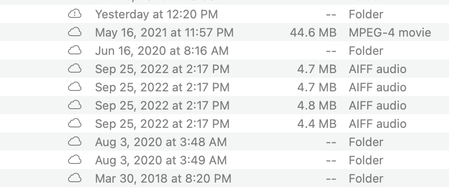
I am assuming work is being done in the background, but as of a few days ago, I no longer have green circles for downloaded (available offline) files. Everything has a cloud symbol (that symbol doesn...


THX1965
3 years agoHelpful | Level 6
Jay - I will of course still send you my txt log files, but I have decided to leave the Beta program.
The problems I have been facing with this Beta version have brought my business down to its knees. I am moving back to repair the damage.
Again, the outreach by Dropbox to join the Beta - especially for macOS Venture users - made it sound like a permanent switch to the new version was imminent (by the end of April at the latest if I remember this correctly). I expected a much better-functioning version of the app.

Nancy Dropbox Community Moderator
2 years agoDropbox Community ModeratorHi THX1965, and I’m sorry to hear about the situation.
If you want, you can post the error log you’ve received here, so that we can take a look.
Also, if you’ve already switched out of the beta version and you’re still having issues with your Dropbox account, please let me know.
- THX19652 years agoHelpful | Level 6
Thank you Nancy - I have attached the latest error log below.
Yes, I have switched out of the Beta and everything's syncing again. The sync status icons are the only thing I cannot get to work. There are none. I have tried all the tips on this forum (quit, restart, reinstall, full disk access on/off/on, force quit Finder...). No icons.
Thanks in advance.
bn.BUILD_KEY: Dropbox
bn.VERSION: 171.3.6135
bn.constants.WINDOWS_SHELL_EXT_VERSION: 61
bn.is_frozen: True
machine_id: 9fefeff3-887f-59e1-9589-c53169475207
pid: 64182
ppid: 1
uid: 501
user_info: pwd.struct_passwd(pw_name='***', pw_passwd='********', pw_uid=501, pw_gid=20, pw_gecos='Mark ***', pw_dir='/Users/****', pw_shell='/bin/zsh')
effective_user_info: pwd.struct_passwd(pw_name='(((', pw_passwd='********', pw_uid=501, pw_gid=20, pw_gecos='Mark ***', pw_dir='/Users/***', pw_shell='/bin/zsh')
euid: 501
gid: 20
egid: 20
group_info: grp.struct_group(gr_name='staff', gr_passwd='*', gr_gid=20, gr_mem=['root'])
effective_group_info: grp.struct_group(gr_name='staff', gr_passwd='*', gr_gid=20, gr_mem=['root'])
DYLD_LIBRARY_PATH: None
cwd: '/'
real_path='/'
mode=0o40755 uid=0 gid=0
parent mode=0o40755 uid=0 gid=0
HOME: '/Users/****'
appdata: '/Users/***/.dropbox/instance2'
real_path='/Users/***/.dropbox/instance2'
mode=0o40700 uid=501 gid=20
parent mode=0o40755 uid=501 gid=20
dropbox_path: '/Users/***/Library/CloudStorage/Dropbox'
real_path='/Users/***/Library/CloudStorage/Dropbox'
mode=0o40700 uid=501 gid=20
parent mode=0o40755 uid=501 gid=20
sys_executable: '/Users/***/Library/Application Support/Dropbox/Dropbox.app/Contents/MacOS/Dropbox'
real_path='/Users/****/Library/Application Support/Dropbox/Dropbox.app/Contents/MacOS/Dropbox'
mode=0o100755 uid=501 gid=20
parent mode=0o40755 uid=501 gid=20
trace.__file__: '/Users/****/Library/Application Support/Dropbox/Dropbox.app/Contents/Resources/python-packages.zip/dropbox/client/ui/common/boot_error.pyc'
real_path='/Users/****/Library/Application Support/Dropbox/Dropbox.app/Contents/Resources/python-packages.zip/dropbox/client/ui/common/boot_error.pyc'
not found
parent not found
tempdir: '/var/folders/39/yph90nr57_g2lyrx2qt1181c0000gn/T'
real_path='/private/var/folders/39/yph90nr57_g2lyrx2qt1181c0000gn/T'
mode=0o40700 uid=501 gid=20
parent mode=0o40755 uid=501 gid=20
Traceback (most recent call last):
File "dropbox/client/main.pyc", line 823, in wrapper
File "dropbox/client/main.pyc", line 6348, in finish_dropbox_boot
File "dropbox/client/message_queue.pyc", line 306, in _wrapped
File "dropbox/client/main.pyc", line 5890, in _init_components_for_account
File "dropbox/client/main.pyc", line 5814, in create_sync_engine
File "dropbox/sync_engine_boundary/factory.pyc", line 225, in make_sync_engine
File "dropbox/sync_engine/nucleus/classic_client/sync_engine.pyc", line 243, in __init__
File "dropbox/sync_engine/nucleus/classic_client/modern_client/modern_client.pyc", line 324, in __init__
File "dropbox/client/gandalf/legacy.pyc", line 296, in add_on_changed_callback
File "dropbox/sync_engine/nucleus/classic_client/modern_client/modern_client.pyc", line 487, in _update_feature_configs
File "dropbox/sync_engine/nucleus/classic_client/modern_client/modern_thin_client.pyc", line 286, in UpdateFeatureConfigForFswRules
File "dropbox/sync_engine/nucleus/thin_client/fp_client.pyc", line 236, in __getattr__
dropbox.sync_engine.nucleus.thin_client.exceptions.NucleusConnectionTimeoutError: Nucleus clients are not running. Connection error: Error Domain=com.dropbox.fileprovider.error Code=5 "(null)" UserInfo={NSUnderlyingError=0x600001a5b840 {Error Domain=NSFileProviderInternalErrorDomain Code=12 "(null)"}}- Megan2 years ago
Hi THX1965, keep in mind that based on the log info you sent my way, it seems you're still using the Beta version, for the new macOS.
I'm happy that everything is syncing as expected now! As for the syncing icons, that behavior would be expected due to the new update.
You can see more about the new icons, in this Help Center article. If you have any questions, let me know!
- THX19652 years agoHelpful | Level 6
Megan - thanks for responding. The log was from before I left the Beta. I grabbed the log when Dropbox Beta told me it couldn't start. I thought it might be of interest to the dev team.
I have since clicked the button "Leave Beta" and the Dropbox folder was moved back into my user folder and popped back up under "Favorites" again.
I had sync icons in the Beta version (even though they didn't work correctly), but now I have none. I have also deleted the Dropbox app (and all connected little folders by using a de-installation app) and reinstalled it from the Dropbox website from scratch - just to make sure I use the latest official version.
This is what I am running at the moment:
About Create, Upload, and Share
Find help to solve issues with creating, uploading, and sharing files and folders with Dropbox.
The Dropbox Community team is active from Monday to Friday. We try to respond to you as soon as we can, usually within 2 hours.
If you need more help you can view your support options (expected response time for an email or ticket is 24 hours), or contact us on X, Facebook or Instagram.
For more info on available support options for your Dropbox plan, see this article.
If you found the answer to your question in this Community thread, please 'like' the post to say thanks and to let us know it was useful!


