Your workflow is unique 👨💻 - tell us how you use Dropbox here.
Forum Discussion

bauss
8 years agoExplorer | Level 4
Dropbox not syncing certain files
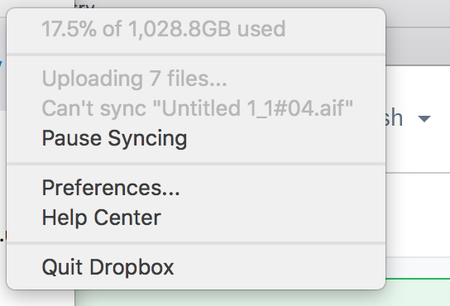
For the past few days, dropbox has not synced a few specific files on my mac. I get this when I check the status in menu bar I've cleared cache, fixed permissions, and run check disk...
 7 years ago
Problem possibly solved, but I don't really know how. I logged out of dbox online then closed and opened dbox desktop. Then I dragged the master file (with it's sub-files) into the dbox folder. I got a message asking if I want to replace the file duplicates (which meant the files were in dbox online but I wasn't able to view them before). I answered, Skip. The sync closed, then I logged on to dbox online and all the files were there. Let's hope the issue doesn't re-occur. :)

SJFarrell
8 years agoExplorer | Level 4
Interestingly enough, I've tried a couple of experiments. All of these I've done on a clean reboot, so theres no software locking the files or writing to them or using them.
1) Renaming the file does NOT fix the problem, dropbox immediately says it can't sync the new file name. This rules out any invalid character concerns.
2) Moving the file out of the dropbox, and then moving it back in, does NOT fix the problem. Dropbox immediately refuses to sync the file.
3) Trying to upload to the folder its residing in via the web version of Dropbox DOES work. This leads me to believe that its not a problem with the file itself, as dropbox handles it fine.
I would guess its dropbox caching a file descriptor that says the file is locked or is in use, and then failing to update or clear this information and therefore just refusing to sync the file.

Chris_J Super User alumni
8 years agoSuper User alumniThanks for reporting here, can you submit a Support Ticket?
There seems to be something the Dropbox team needs to see here.
Submit a ticket https://www.dropbox.com/support
Check or update Ticket via https://www.dropbox.com/support?ref=dropboxsupport
Please be patient and it will take some time and please include this Thread url as it contains useful info. And Good Luck
 bauss8 years agoExplorer | Level 4
Just did.. thanks!
 sweetsound20018 years agoExplorer | Level 4
Having the same exact issue, and all the files that won't sync came from Logic Studio X (High Sierra). The same exact files and folders synced just fine, without any errors whatsoever from my Sierra computer, so this is most definitely a High Sierra Dropbox app issue.
- clegs7 years agoNew member | Level 2
I am having the same problem of Dropbox not syncing at least half of my songs/audio files (and it follows the alphabetical order that the files are sorted in a folder/path Cakewalk Projects>Audio, then the individual audio files (wave) by the song names . These files were recorded with Cakewalk Sonar (a recording program similar to Logic). Total files in the file dragged into the Dropbox PC folder is about 4 GB. There is no error message, etc.; it just completes the sync, but stops too early and doesn't complete the transfer. I tried a number of times and can't find anything I'm doing different than my usual DBox procedures. Any suggestions? I've been with Dropbox for years, but just started using it for audio backup. Unfortunately, this is a deal killer if I can get this to work and I will have to go to another service. I hope you can help.
- clegs7 years agoNew member | Level 2
Problem possibly solved, but I don't really know how. I logged out of dbox online then closed and opened dbox desktop. Then I dragged the master file (with it's sub-files) into the dbox folder. I got a message asking if I want to replace the file duplicates (which meant the files were in dbox online but I wasn't able to view them before). I answered, Skip. The sync closed, then I logged on to dbox online and all the files were there. Let's hope the issue doesn't re-occur. :)
- Chris_J7 years ago
Hello clegs
Thanks for sharing your experience. I wanted to clarify a few things. when you dragged the folders/files into your Dropbox folder, it does not necessarily mean that's it is online or on Dropbox Server, we hope that it is because it's supposed to be uploaded automatically. I just wanted to clarify when your PC asked if you want to replace the files duplicates, it just means that the files were physically there and were asking if you want to replace them.
However, is it possible that this program that you use, put a 'lock' on these files? Have you tried quitting (not just closing the application but making sure it's not running in the background) to see ifs not 'locking' the file/files?I don't know if any issues is with the filenames or such, can you look at this Help Center Article to see if anything applies to you? https://www.dropbox.com/help/syncing-uploads/stuck-syncing
About Create, Upload, and Share
Find help to solve issues with creating, uploading, and sharing files and folders with Dropbox.
The Dropbox Community team is active from Monday to Friday. We try to respond to you as soon as we can, usually within 2 hours.
If you need more help you can view your support options (expected response time for an email or ticket is 24 hours), or contact us on X, Facebook or Instagram.
For more info on available support options for your Dropbox plan, see this article.
If you found the answer to your question in this Community thread, please 'like' the post to say thanks and to let us know it was useful!


