Our Community is in read-only mode until April 8th, learn more here. You can still search existing threads or get help via Dropbox Support, the Dropbox Help Center, or Learn.
Forum Discussion

Pindarodge
5 years agoNew member | Level 2
Exclude folders on Mac
Hi,
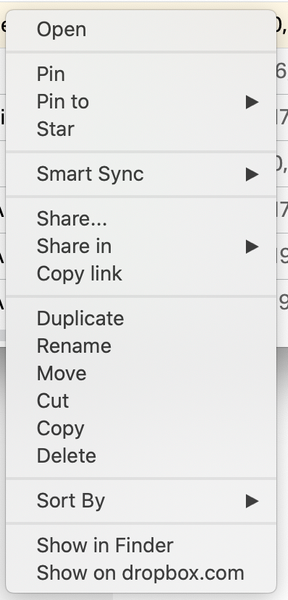
I have a Dropbox Plus account running on a mac in which I have a folder that I want dropbox to ignore when syncing. So it doesn't need to be stored on dropbox.com and only on my desktop.
...
 5 years ago
Hi Lusil,
Somehow the option appeared when I was checking if the folder was shared. So now the dropdown did have the "don't sync to dropbox.com" option present. Not a clue what caused the change. Maybe a reboot? But thanks for the reply otherwise I wouldn't have taken this action:)
Best,
Rogier

Lusil Dropbox Staff
5 years agoDropbox StaffHey there Pindarodge, let's see what we can find.
I could only recreate the same options that you see when selecting a shared folder.
Could you let me know if you're trying to choose a shared folder to be ignored?
Looking forward to hearing back from you!
Pindarodge
5 years agoNew member | Level 2
Hi Lusil,
Somehow the option appeared when I was checking if the folder was shared. So now the dropdown did have the "don't sync to dropbox.com" option present. Not a clue what caused the change. Maybe a reboot? But thanks for the reply otherwise I wouldn't have taken this action:)
Best,
Rogier
About Create, Upload, and Share
Find help to solve issues with creating, uploading, and sharing files and folders with Dropbox.
The Dropbox Community team is active from Monday to Friday. We try to respond to you as soon as we can, usually within 2 hours.
If you need more help you can view your support options (expected response time for an email or ticket is 24 hours), or contact us on X, Facebook or Instagram.
For more info on available support options for your Dropbox plan, see this article.
If you found the answer to your question in this Community thread, please 'like' the post to say thanks and to let us know it was useful!


