Your workflow is unique 👨💻 - tell us how you use Dropbox here.
Forum Discussion

TonyEnglund
2 years agoCollaborator | Level 9
External sharing of Team Folders.
Hi all,
I'm the admin of a few Dropbox Business teams, and on some i can share team folders to external people which is really helpful.
How about you, do you have the option to add email ...

Megan Dropbox Community Moderator
2 years agoDropbox Community ModeratorHi TonyEnglund, thanks for clarifying!
Since you’re an admin on your Dropbox team account, you can manage how your team members share files/folders with users from outside the team as follows:
Sign in to dropbox.com with your admin credentials and click Admin Console, then Settings.
Navigate to Sharing and you should be able to find options allowing you to manage how your team members can share files/folders with external users including setting up an approved list.
Can you check that, and report back to me?

TonyEnglund
2 years agoCollaborator | Level 9
Megan , please have a look at the screen shots in my first post.
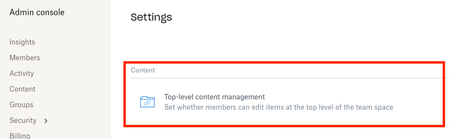
There you can see that i have the option to invite external people with their email address. Also in the admin > settings i have the row "Top-level content management". In this scenario, i can share a team folder externally.
On other teams i manage, there is no setting fot "Top-level content management" and therefor i cannot share a team folder externally.
So, my only question is why some teams can share team folders and others can not. And, i would really like to have the option to share team folders externally on all teams as that would make life much easier 🙂
- Walter2 years ago
Hey TonyEnglund - sorry to jump in here, but I just wanted to mention that it sounds like you're managing two separate Dropbox for Teams accounts which happen to be on different file/folder structure by default/design.
The team with the (admin) option for "top'level management" is on the newer version of Dropbox for Business Teams that has access to the team space instead of the older Team folders.
That said, thank you for sharing your thoughts on this with us. I've logged your feedback in our system, but please let us know if you have anything else to add or ask.
- TonyEnglund2 years agoCollaborator | Level 9
Thanks for clearing it out a bit Walter !
Do you have any ideas when customers on the old version will get an update? Or is it possible to ask for an update?
- Hannah2 years ago
Hey TonyEnglund, the update of the Dropbox Business structure is currently being rolled out and you'll get an email, notifying you about when it will happen for your team(s) as well, prior to the update of course, so make sure to keep an eye on your Dropbox emails. 🙂


About Create, Upload, and Share
Find help to solve issues with creating, uploading, and sharing files and folders with Dropbox.
The Dropbox Community team is active from Monday to Friday. We try to respond to you as soon as we can, usually within 2 hours.
If you need more help you can view your support options (expected response time for an email or ticket is 24 hours), or contact us on X, Facebook or Instagram.
For more info on available support options for your Dropbox plan, see this article.
If you found the answer to your question in this Community thread, please 'like' the post to say thanks and to let us know it was useful!


