Our Community is in read-only mode until April 8th, learn more here. You can still search existing threads or get help via Dropbox Support, the Dropbox Help Center, or Learn.
Forum Discussion

David C.163
1 year agoNew member | Level 2
File right-click does not reveal menu options like 'make available offline' on Windows
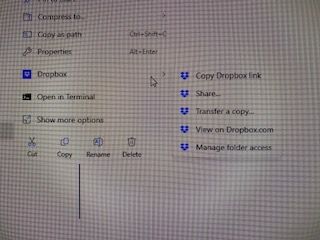
When I right-clicks Dropbox files in Explorer, I only get these options:
I am NOT getting the option to "make available offline".
How do I remedy this?
Thanks.

David C.163
1 year agoNew member | Level 2
Hi Megan
Thanks for your thoughts.
I've not updated the OS because the computer is brand new.
I went through the steps.
DropBox already occupies the first 10 places on the register. See below:
Hmm!?
- Megan1 year ago
Dropbox Community Moderator
Thanks for checking anyways David C.163!
In your two initial screenshots, it looks like you're clicking directly onto the Dropbox folder.
If you click on a folder residing in your Dropbox folder, do you see the option there, or still no luck?
I'd also like to know the app's version and syncing status. You should be able to find that info by hovering your mouse over the little Dropbox icon on your task bar, next to your WiFi. Can you try once again?

About Create, Upload, and Share
Find help to solve issues with creating, uploading, and sharing files and folders with Dropbox.
The Dropbox Community team is active from Monday to Friday. We try to respond to you as soon as we can, usually within 2 hours.
If you need more help you can view your support options (expected response time for an email or ticket is 24 hours), or contact us on X, Facebook or Instagram.
For more info on available support options for your Dropbox plan, see this article.
If you found the answer to your question in this Community thread, please 'like' the post to say thanks and to let us know it was useful!


