Need to see if your shared folder is taking up space on your dropbox 👨💻? Find out how to check here.
Forum Discussion

cmonnahan
2 years agoExplorer | Level 3
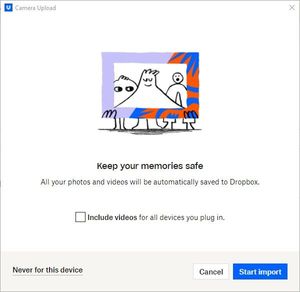
Fix Existing Button for Camera Uploads on the desktop
Hello,
Anytime I place a disc into my disc drive that contains files or photos, I receive a pop-up notification from Dropbox asking if I'd like to upload items to a Dropbox Folder. In the lowe...

Walter Dropbox Community Moderator
2 years agoDropbox Community ModeratorHi there cmonnahan - thanks for bringing this to our attention.
Could you please clarify how long has it been since you first noticed this and also let us know your device's OS version and the version of the Dropbox desktop app installed there as well?
Thanks!

cmonnahan
2 years agoExplorer | Level 3
Hello, Walter!
I couldn't tell you with any kind of precision when I first noticed this pop-up. Only that it has been this way for a while. I thought that it would correct itself through an update or some background technological magic.
I am running Windows 10 OS Build 19044-3086. This is a work device so I have no control over updates and whatnot.
According to my Windows Apps and Features screen, Dropbox is on version 193.4.5594.
About Create, upload, and share
Find help to solve issues with creating, uploading, and sharing files and folders in Dropbox. Get support and advice from the Dropbox Community.
The Dropbox Community team is active from Monday to Friday. We try to respond to you as soon as we can, usually within 2 hours.
If you need more help you can view your support options (expected response time for an email or ticket is 24 hours), or contact us on X, Facebook or Instagram.
For more info on available support options for your Dropbox plan, see this article.
If you found the answer to your question in this Community thread, please 'like' the post to say thanks and to let us know it was useful!


