We're making some changes to the Dropbox Community 👩💻 - Find out more here.
Forum Discussion

lukevan
3 years agoExplorer | Level 4
Folder commands missing from "background" right click when I click on empty space next to folder
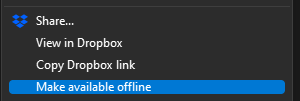
Hi there, previously, one was able to right click in empty space on a folder and have the same commands show up that show when right clicking on a folder:
These are the options that...


Megan Dropbox Community Moderator
3 years agoDropbox Community ModeratorHey lukevan, happy Monday!
What is the current OS version you're using, and how long has this behavior been going on?
Feel free to also let me know the version of the Dropbox app that you have installed on your device.
Thanks!

lukevan
3 years agoExplorer | Level 4
Hey Megan!
I am on Windows 11 21H2, Dropbox App version v159.4.5870, and I can't say exactly but I think it was from about last week. I know something happened as I regularly grab the dropbox link with a right click as I mentioned in the main post.
Thanks
- Hannah3 years ago
Hey lukevan, sorry to jump in here.
Does the folder get selected, when you right-click on the blank space next to it?
And what do you see when you right-click on files (both on the name and on the blank space) outside of Dropbox?
- lukevan3 years agoExplorer | Level 4
Hey Hannah, no problem.
Here is a link to a screen recording to show what I mean.
Specifically:
- Right clicking ON a folder shows Dropbox menu as normal.
- Previously, going into the folder and right clicking in empty space would also show the same menu (that being the options of the parent folder being right clicked in step one). This has since changed.Thanks!


About Create, Upload, and Share
Find help to solve issues with creating, uploading, and sharing files and folders with Dropbox.
The Dropbox Community team is active from Monday to Friday. We try to respond to you as soon as we can, usually within 2 hours.
If you need more help you can view your support options (expected response time for an email or ticket is 24 hours), or contact us on X, Facebook or Instagram.
For more info on available support options for your Dropbox plan, see this article.
If you found the answer to your question in this Community thread, please 'like' the post to say thanks and to let us know it was useful!


