Our Community is in read-only mode until April 8th, learn more here. You can still search existing threads or get help via Dropbox Support, the Dropbox Help Center, or Learn.
Forum Discussion

Quuzuu
3 years agoHelpful | Level 5
"Go to file" link in sync issue dialog doesn't work
(Win10) I've been having this issue for a month. It pops up every day.
I don't see any problem with the filename, it doesn't contain any special characters, and I don't know which file i...
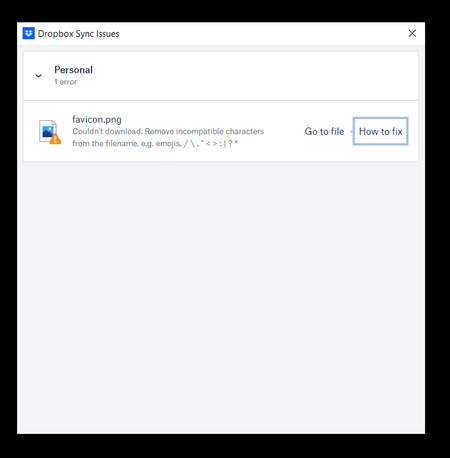
- 3 years ago
Hi Quuzuu,
Your "favicon.png" files count isn't so big. So should not be a big task to compare local and online equivalents. While keep open the local search results, try the same with search bar in web interface of your account. Is there some more additional file(s) or time stamp of matching results differs? 🤔
Hope this gives direction.

Здравко
3 years agoLegendary | Level 20
Hi Quuzuu,
Your "favicon.png" files count isn't so big. So should not be a big task to compare local and online equivalents. While keep open the local search results, try the same with search bar in web interface of your account. Is there some more additional file(s) or time stamp of matching results differs? 🤔
Hope this gives direction.
Quuzuu
3 years agoHelpful | Level 5
Thanks Здравко , I took your advice and compared the online and local files one by one, and was indeed able to find a "favicon.png" online, which was 0 bytes. Deleting it solved the issue.
There are 3 things that the developers could be fixing related to this problem (2 bugs and 1 improvements):
1. clicking the "Go to file" button should work.
2. the error message shouldn't say "incompatible character", because there's none
3. the error message should display a full path of the file, not just the filename.
- Здравко3 years agoLegendary | Level 20
I fully agree with to your suggestions, Quuzuu! 😉 Let's hope some developer will get impressed... 😁 But you shouldn't rely too much... such thing is very unusual... 🤷 ... unfortunately.
 Jay G.43 years agoExplorer | Level 4
Not that unusual, I have exactly the same problem. and a whole lotta files to go through. it's a constant nag and I have to check it every time to see if some new file I really need is stuck in there.
- Здравко3 years agoLegendary | Level 20
Hi Jay G.4,
That was exactly what I said. Probably you misinterpret the target of word "unusual". Unfortunately, such problems appearing is something usual. 🤦 Unusual is they to get solved by application development team! Problems like this (and not only) stay for years and left unsolved (without any intention to) or got solved after ... years. 🤷 Fast solutions are mostly exceptions (in case the application stops completely).
About Create, Upload, and Share
Find help to solve issues with creating, uploading, and sharing files and folders with Dropbox.
The Dropbox Community team is active from Monday to Friday. We try to respond to you as soon as we can, usually within 2 hours.
If you need more help you can view your support options (expected response time for an email or ticket is 24 hours), or contact us on X, Facebook or Instagram.
For more info on available support options for your Dropbox plan, see this article.
If you found the answer to your question in this Community thread, please 'like' the post to say thanks and to let us know it was useful!


