We're making some changes to the Dropbox Community 👩💻 - Find out more here.
Forum Discussion

Akiko Sasaki-Summers
1 year agoNew member | Level 2
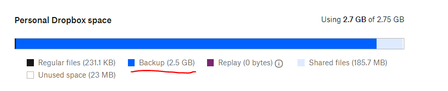
How can I deactivate the unwanted Backup feature?
Hello,
My storage space with the Basic plan is almost gone due to the backup. I've never indicated that I wanted to back up anything on my local system. How may I deactivate the option, which I...
 1 year ago
190 MB is more than enough.
I just wondered why I ended up having the backup of whatever it was for, even without my knowledge. I just wondered if I goofed up something during the setup, etc... If you don't know the reason, I'd just celebrate the fact that it finally worked!
Thanks.
Akiko
Akiko Sasaki-Summers
1 year agoNew member | Level 2
Thank you, Megan, for providing the link. Yes, this resolved the issue. Now, my dropbox is using less than 190 MB.
Was there anything I missed while setting up the account on this newer PC? (I've never had this problem before.)
Thank you again, Megan!
Akiko

Megan Dropbox Community Moderator
1 year agoDropbox Community ModeratorHi Akiko Sasaki-Summers, glad we managed to tackled that one!
As for the 190MB you mentioned, is this too little? What do you mean when you say if there was anything you missed while setting up your account?
- Akiko Sasaki-Summers1 year agoNew member | Level 2
190 MB is more than enough.
I just wondered why I ended up having the backup of whatever it was for, even without my knowledge. I just wondered if I goofed up something during the setup, etc... If you don't know the reason, I'd just celebrate the fact that it finally worked!
Thanks.
Akiko
- Megan1 year ago
Hi Akiko Sasaki-Summers, you must accidentally turned said feature on.
But, I'm glad we managed to resolve everything, and I'm going to be one post away if you need anything else.
Enjoy the rest of your week ahead! 😎
About Create, Upload, and Share
Find help to solve issues with creating, uploading, and sharing files and folders with Dropbox.
The Dropbox Community team is active from Monday to Friday. We try to respond to you as soon as we can, usually within 2 hours.
If you need more help you can view your support options (expected response time for an email or ticket is 24 hours), or contact us on X, Facebook or Instagram.
For more info on available support options for your Dropbox plan, see this article.
If you found the answer to your question in this Community thread, please 'like' the post to say thanks and to let us know it was useful!


