We're making some changes to the Dropbox Community 👩💻 - Find out more here.
Forum Discussion

JRNE
1 month agoNew member | Level 2
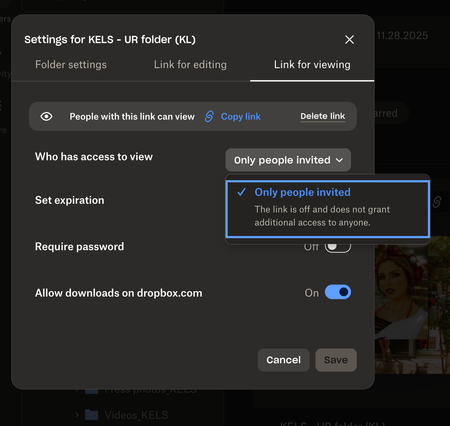
I no longer see the "anyone with link to view" option for shared links on my Dropbox team.
Help! I feel like I am going crazy trying to figure this out. I have a business account and recently have had trouble creating links so that anyone with the link can view.
This is a new issue a...

JRNE
1 month agoNew member | Level 2
Ok I think I may have figured out a clue to the issue. It seems that just the subfolders from this particular Folder (Let's call it the JP Folder) are not giving me an option to share as a link that "anyone can view with link."
When I move the content from this JP Folder to other Folders, then I have am able to create a shareable link that has open access.
When I go to the Settings icon and Manage Permissions of the JP Folder, I don't see any way to change it in way that will allow me to open up the shareable permissions for the subfolders underneath it
About Create, Upload, and Share
Find help to solve issues with creating, uploading, and sharing files and folders with Dropbox.
The Dropbox Community team is active from Monday to Friday. We try to respond to you as soon as we can, usually within 2 hours.
If you need more help you can view your support options (expected response time for an email or ticket is 24 hours), or contact us on X, Facebook or Instagram.
For more info on available support options for your Dropbox plan, see this article.
If you found the answer to your question in this Community thread, please 'like' the post to say thanks and to let us know it was useful!


