Our Community is in read-only mode until April 8th, learn more here. You can still search existing threads or get help via Dropbox Support, the Dropbox Help Center, or Learn.
File access
60 Topics
Is viewing with download disabled for free accounts?
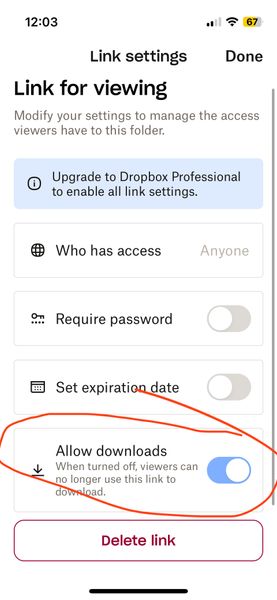
Is viewing with download disabled for free accounts? (I am on a free account) When I go to share (and subsequently generate a link) I now see a mandatory choice of either 1) editable or 2) viewable only. The software defaults to editable (which I think I was inadvertently using for a while and NOT what I want). When I noticed this today, I went to the viewable option instead and then looked at the settings. There are options (see screenshot below) but it seems like the option to have downloads enabled on viewable links is greyed out? But also kind of difficult to tell – it looks lighter blue than normal GUI switches I've seen in the past... It looks like it is on by default but I don't know if it being greyed out means that it is stuck on or that it is not functional (meaning even though its showing as on, the greyed-out-ness means it is actually off AKA no downloads for recipient). Can you please clarify this confusing interface before I send the link? I do not want to send things then recipients say they can't access it. The interface really shouldn't be this confusing. Thanks!Solved59Views0likes2Comments
File edit access in view only folder
Dropbox Plan (Personal) Are you a Team Member or Admin? () Do you have access to the email linked to the account? (Yes) Are there any devices connected to your Dropbox account? (Phone.) Question or Issue I have shared a folder and set permissions to view only. I want to give edit access to a single file within the folder, but when i select Manage Permissions, the permissions for all users is ghosted and can not be changed. I am the folder and file owner. Is there a way for me to change edit permission of individual files?68Views0likes2Comments
Files not being shared across group members
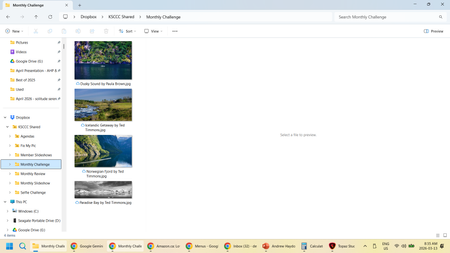
Device PC, Mac Operating System/Browser (if using the web) Windows 11 We use the free version. Question or Issue We use dropbox to share pictures for our camera club. Lately we have been having issues with members seeing a different set of pictures in their PC folders then what is on the web. As well, what members see on the web is also different. Personally I have seen my dropbox folder empty, but when I go to the web, there are pictures in the folder. I have also used my folder to create a video of our pictures only to find out that some were missed because they were not in my folder, but they were on the web. Another member sees a different set of pictures in their folder than I do. Here is a screen shot of what I see: Here is a screen shot of what they see: On the web, it looks like what I see. We have three people that add pictures to the folder at different times. Some through uploading on the web and others by copying into their folder. We have only started having issues with this in the last few months.99Views0likes7Comments
Why is Dropbox indexing on every restart of my computer?
Using a M3 Ultra Mac Studio, Sequoia 15.5, with Dropbox v239.4.8301 running on an external drive. This issue has been an issue since last June, and I have been lucky to avoid any major issues until today. Whenever I restart/shut off and turn my computer back on, Dropbox always has to go through the process of re-indexing everything. I work off of dropbox directly, and use shared folders to send files back and forth with collaborators/clients/etc. After I did a necessary restart for an unrelated software issue (Pro Tools for the work I do), and naturally the indexing process had begun. However, it's been going on for the past 5+ hours, and the work I completed this morning can't be sent until dropbox is done indexing, and my collaborator can't access any of my work until dropbox has completed the indexing process. We are under tight deadlines, and we have lost half a day due to this issue. Is there anyway to stop dropbox from re-indexing everything on startup? This was never an issue in the past, and I would rather not have to change my workflow, but I desperately need this to be resolved.282Views0likes8Comments
Can recipients of a shared folder link view other recipients of the same link?
I have some large files (several GB each) that I would like to make available to customers to test my company's software. Due to the file sizes, upload/download times can be quite long, and I don't want to chew up my organization's storage space by uploading each file multiple times. So, I'd like to place the files in a single Dropbox folder and share the link with each relevant customer. However, I want to make sure that anyone who I share the link with can't see who else I've sent it to. Recipients of the link may be early in the adoption process and can't be officially "exposed" as customers yet, and our customers may be competitors with each other, so I want to be sure that no one outside my organization can see anyone else who isn't part of either their or my organization. For example: In this folder, I am RK, BC is my colleague, and XH and ZW are employees at one of our customers. However, if XH and ZW weren't colleagues, I would want each of them to only see themselves, RK, and BC as members of the folder. Does this feature exist, and if so, how can I enable it in shared folders? I would want this obscurity to propagate downwards to any sub-folders (and sub-sub-folders) as well.Solved193Views0likes4CommentsI can't open a folder shared with me; it appears grayed out on the Dropbox website.
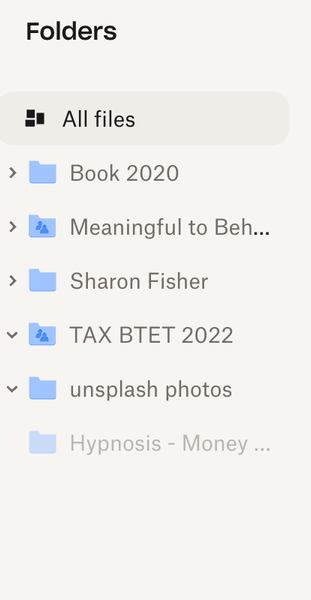
Device mac Book Air Operating System/Browser (if using the web) Chrome Syncing Status I have no idea how to check this Question or Issue I'd like to access the Hypnosis -Money folder--it is a MP3 shared with me but I can't --as you can see it is shaded out. Not clickable. Thanks!91Views0likes3CommentsThe admin needs to send a code every time someone wants to access a shared file.
accessing new shared files was easy by opening the email link. Now the admin person has to send a code as well for access. It is very confusing for not tech savvy people and also means the admin person has to be available all the time to send the code. please stop this nonsense or tell me how I can turn it off.70Views0likes1Comment
When sharing a link to a parent folder, does a subfolder inherit the permissions of the parent?
Hi, With a dropbox basic account, does a subfolder inherit the permissions of the parent folder? Suppose I make a folder (Folder A) that anyone can view with a link, but within it (Folder B), I change the permission to "only people invited," will Folder B still inherit Folder A's permissions even if I changed the permissions of Folder B? So can anyone with the link of Folder A see the contents inside Folder B? Thank you so much in advance! Best, John195Views0likes3Comments
I no longer see the "anyone with link to view" option for shared links on my Dropbox team.
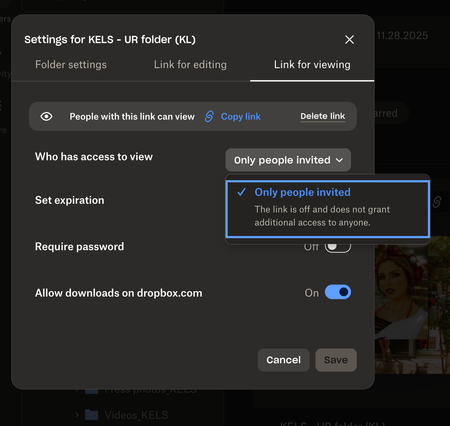
Help! I feel like I am going crazy trying to figure this out. I have a business account and recently have had trouble creating links so that anyone with the link can view. This is a new issue and one I haven't had before. It used to be so easy to create folders and links to share easily with colleagues but not no matter where I look, I am not seeing that option anyomore. It only gives me the option to invite individual people to view/edit the folders I am creating. Is there something I missing or a restriction I mistakenly added to my account? I'd rather "anyone with the link to view" be my default than it be protected as 90% of the time I want to create links that are easily shareable and viewable. See attached screenshot. Is anyone else having this issue as of late? Thanks in advance for any help you guys can provide!157Views0likes3Comments