Your workflow is unique 👨💻 - tell us how you use Dropbox here.
Forum Discussion

Leo24
5 years agoExplorer | Level 3
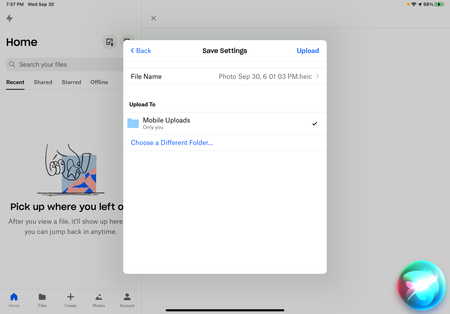
My photos are not changing to jpg format when uploading them to Dropbox from my iOS device.
For the Dropbox version IOS app 208.2.12 there is a bug that needs to be fixed and updated. I am using an iPad Pro 11" first generation. I am an ebay Powerseller. When taking pictures of my purses ...
- 5 years ago
Hi Leo24, I hope you're having a good week so far!
The setting in the Dropbox app is for when you upload photos through automatic camera uploads. Are you perhaps uploading the photos manually?
Perhaps I can suggest changing the format through your Camera settings with the steps outlined here.
Let me know if this helps - thanks!


jennypr027
9 months agoNew member | Level 2
I've encountered a similar issue with the Dropbox iOS app version 208.2.12 on my iPad Pro 11" (first generation). Specifically, when uploading photos of certain items, such as designer purses, the images remain in the HEIC format, whereas other photos, like those of my Bengal cats or medical bills, are correctly recognized as JPG or PNG formats.
At Choice Point Health, we understand the importance of seamless digital processes, especially when dealing with sensitive information like medical records. Ensuring your images are in the correct format is crucial for efficient handling.
About Create, Upload, and Share
Find help to solve issues with creating, uploading, and sharing files and folders with Dropbox.
The Dropbox Community team is active from Monday to Friday. We try to respond to you as soon as we can, usually within 2 hours.
If you need more help you can view your support options (expected response time for an email or ticket is 24 hours), or contact us on X, Facebook or Instagram.
For more info on available support options for your Dropbox plan, see this article.
If you found the answer to your question in this Community thread, please 'like' the post to say thanks and to let us know it was useful!


