We’re Still Here to Help (Even Over the Holidays!) - find out more here.
Forum Discussion

jetnova16
9 months agoNew member | Level 2
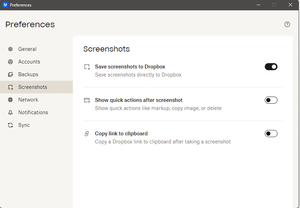
My screenshots don't save to my Dropbox account on Windows, even though the feature is enabled.
My screenshots are not saving to Dropbox at all even though the option is checked to do so right under settings. In fact I have the Snipping Tool for Windows 11 turned 100% off because I hate the dan...

Jay Dropbox Community Moderator
9 months agoDropbox Community ModeratorHI jetnova16, did you disable the Snipping Tool in the same way as these steps?
When taking a screenshot, do you only press the Print Screen button, or do you also need to press a function key on your laptop at the same time?

jetnova16
9 months agoNew member | Level 2
Do you NOT KNOW HOW TO READ? I HAVE ALREADY STATED THAT I HAVE TURNED OFF MICROSOFT'S TRASH SNIPPING TOOL AND AS SUCH IT IS 100% DISABLED FOR I DO NOT LIKE THAT STUPID & ILLOGICAL TRASH OF A TOOL! It is in fact one of the FIRST THREE THINGS I DISABLED RIGHT AFTER SETTING UP THIS NEW LAPTOP; The SECOND BEING: ONEDRIVE!
100% PROOF that the stupid Snipping Tool is turned off as I have stated directly in my FIRST POSTING on this issue!
About Create, upload, and share
Find help to solve issues with creating, uploading, and sharing files and folders in Dropbox. Get support and advice from the Dropbox Community.
The Dropbox Community team is active from Monday to Friday. We try to respond to you as soon as we can, usually within 2 hours.
If you need more help you can view your support options (expected response time for an email or ticket is 24 hours), or contact us on X, Facebook or Instagram.
For more info on available support options for your Dropbox plan, see this article.
If you found the answer to your question in this Community thread, please 'like' the post to say thanks and to let us know it was useful!


