Our Community is in read-only mode until April 8th, learn more here. You can still search existing threads or get help via Dropbox Support, the Dropbox Help Center, or Learn.
Forum Discussion

wshane
4 years agoExplorer | Level 3
New sync icons - red exclamation point and arrows in a circle
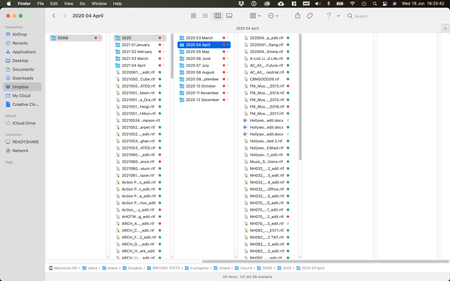
I recently removed several folders from my Selective Sync, and then decided to add them back in. However, after they finished restoring, I now have two new icons that have shown up on some files, a r...
- 4 years agoHey wshane, I hope you're doing well!
You can find out more with regards to the Dropbox syncing icons here.
However, as you mentioned, these look different than the red X. Can I ask what your syncing status is?
If I were you, I'd try to reboot my device as well.
Also, if you move a file outside of your Dropbox folder, does the red exclamation mark remain?

Megan Dropbox Community Moderator
4 years agoDropbox Community ModeratorHey wshane, I hope you're doing well!
You can find out more with regards to the Dropbox syncing icons here.
However, as you mentioned, these look different than the red X. Can I ask what your syncing status is?
If I were you, I'd try to reboot my device as well.
Also, if you move a file outside of your Dropbox folder, does the red exclamation mark remain?
You can find out more with regards to the Dropbox syncing icons here.
However, as you mentioned, these look different than the red X. Can I ask what your syncing status is?
If I were you, I'd try to reboot my device as well.
Also, if you move a file outside of your Dropbox folder, does the red exclamation mark remain?

Mark Super User II
4 years agoSuper User IIPart of the issue may be the inclusion of the ! in your folder names as this is an illegal character on Dropbox 🙂
About Create, Upload, and Share
Find help to solve issues with creating, uploading, and sharing files and folders with Dropbox.
The Dropbox Community team is active from Monday to Friday. We try to respond to you as soon as we can, usually within 2 hours.
If you need more help you can view your support options (expected response time for an email or ticket is 24 hours), or contact us on X, Facebook or Instagram.
For more info on available support options for your Dropbox plan, see this article.
If you found the answer to your question in this Community thread, please 'like' the post to say thanks and to let us know it was useful!


