Our Community is in read-only mode until April 8th, learn more here. You can still search existing threads or get help via Dropbox Support, the Dropbox Help Center, or Learn.
Forum Discussion

LB15
1 year agoExplorer | Level 3
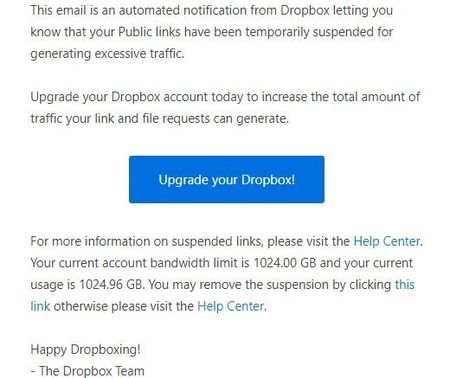
"Public links have been temporarily suspended for generating excessive traffic." Please help!
I outsource my work and make my content available to a number of individuals that need access to it. I am currently unable to share my links anymore do to: "Public links have been temporarily suspend...

Nancy Dropbox Community Moderator
1 year agoDropbox Community ModeratorHey LB15. If this is the first time you’re having this issue, then the ban will be automatically lifted within 24h.
Please keep in mind that upgrading your Dropbox account won’t resolve the banned links issue, but rather increase your bandwidth in the future (depending on the plan you’ve chosen).

LB15
1 year agoExplorer | Level 3
I can't afford a standard plan which seems the only option for increasing bandwidth for sharing. I already mistakenly increased to a more expensive plan that doesn't improve bandwidth. Are these bandwidth rules new?
- Nancy1 year ago
Not really, these bandwidth limits have been there for a long time.
- LB151 year agoExplorer | Level 3
It has been approx 24 hours and my links have not been restored.
- Rouben Freeman1 year agoExplorer | Level 4
I have just had this come up for the very first time. I share important files regularly and don't want to get blocked just when I need it most. How do we track our Public links to avoid "excessive traffic"? If I can see the numbers I might be better able to avoid this sorry situation.
- Nancy1 year ago
Hey Rouben Freeman. Your bandwidth limits depend on your current plan. You can see more info about this here.

About Create, Upload, and Share
Find help to solve issues with creating, uploading, and sharing files and folders with Dropbox.
The Dropbox Community team is active from Monday to Friday. We try to respond to you as soon as we can, usually within 2 hours.
If you need more help you can view your support options (expected response time for an email or ticket is 24 hours), or contact us on X, Facebook or Instagram.
For more info on available support options for your Dropbox plan, see this article.
If you found the answer to your question in this Community thread, please 'like' the post to say thanks and to let us know it was useful!


