Need to see if your shared folder is taking up space on your dropbox 👨💻? Find out how to check here.
Forum Discussion

DeeAyeVee
10 months agoExplorer | Level 4
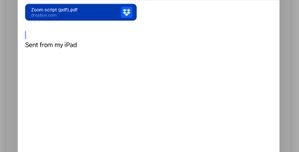
Recipients see a large Dropbox folder icon when I'm sharing files to their email from my iPad.
This is what I sent
this is what was recieved:

DeeAyeVee
10 months agoExplorer | Level 4
Chat transcript:
( 19:01:51 ) Visitor: I sent a email with a link to a PDF file on dropbox and for some reason, it added a PNG image of the dropbox folder icon. Any idea why?
( 19:02:14 ) Joey: Hello David! Thank you for contacting Dropbox support today! My name is Joey and I would be more than happy to assist you right away!
( 19:02:33 ) Visitor: it wasn't there when I sent the email, only visible to the recipient, which makes it worse because I wasn't able to catch it before it was sent.
( 19:02:34 ) Joey: So, if I understand correctly you sent an email with a link to a PDF file on Dropbox.
( 19:02:50 ) Visitor: Yep
( 19:03:04 ) Visitor: I did a copy and paste from dropbox to email
( 19:03:17 ) Joey: It added a PNG image of the Dropbox folder to the email that you sended.
( 19:03:19 ) Joey: Right?
( 19:03:32 ) Visitor: Yes
( 19:03:47 ) Joey: If you want to share files or folders it would be better to do it by creating a shared link.
( 19:04:13 ) Visitor: why? Why have the other option if it's not going to work correctly.
( 19:04:16 ) Joey: Shared folder is another option, very useful if you want to share a lot of files or even collaborate.
( 19:04:23 ) Joey: Which option?
( 19:04:47 ) Visitor: I clicked on copy link in the dropbox app. Should I not use that?
( 19:04:59 ) Joey: You clicked Share?
( 19:05:11 ) Visitor: yes, and then copy link which is one of the options
( 19:05:26 ) Joey: Yes, this is the correct way.
( 19:05:35 ) Visitor: what would be the wrong way?
( 19:06:03 ) Joey: Copy the URL from the Dropbox website is an example.
( 19:06:17 ) Joey: Drag and drop the photo from your Dropbox to somewhere else is another.
( 19:06:29 ) Joey: Creating a shared link or a shared folder is the correct way.
( 19:06:50 ) Joey: There are some sites that support another option, to upload directly from Dropbox.
( 19:08:25 ) Visitor: Well, it sounds like I did it right, so consider this a complaint. It didn't work the way it was supposed to
( 19:08:57 ) Joey: You informed me that you send an email with a link, right?
( 19:09:33 ) Joey: Was that a shared link for the whole folder or just the file?
( 19:09:56 ) Joey: Maybe you click else something by mistake.
( 19:10:24 ) Joey: *Clicked something else by mistake.
( 19:12:36 ) Visitor: I tapped on share, and then copy link, and then I pasted it into the email. It turned into a blue rectangle that said the name of a file, pdf, dropbox.com. When I look at the same email in my sent folder, or in another inbox folder which I sent it to as a test, what I see is the blue rectangle, but somewhat distorted, and a big icon shaped like a folder with the dropbox icon in the middle, when I open that image, it says it's a PNG file.
( 19:13:21 ) Joey: Can you provide me with a screenshot of the issue?
( 19:16:22 ) Joey: Checking if we are still connected.
( 19:17:31 ) Visitor: Can't seem to paste an image from Photos into this
( 19:17:38 ) Joey: I will now send you an upload button which you can use to upload the screenshot.
( 19:18:13 ) Visitor: File: [removed]
( 19:18:23 ) Visitor: Can you send me another upload button I'll show you the before picture
( 19:19:16 ) Joey: Of course!
( 19:19:32 ) Visitor: File: [removed]
( 19:19:52 ) Joey: So, what is the issue David?
( 19:20:20 ) Visitor: The issue is that great big folder icon, the recipient of this email is going to receive it and they are going to be confused.
( 19:21:29 ) Joey: I will make sure to pass your suggestion to my Team, thank you very much for sharing.
( 19:22:15 ) Joey: Is there anything else I can do for you today in this chat?


About Create, upload, and share
Find help to solve issues with creating, uploading, and sharing files and folders in Dropbox. Get support and advice from the Dropbox Community.
The Dropbox Community team is active from Monday to Friday. We try to respond to you as soon as we can, usually within 2 hours.
If you need more help you can view your support options (expected response time for an email or ticket is 24 hours), or contact us on X, Facebook or Instagram.
For more info on available support options for your Dropbox plan, see this article.
If you found the answer to your question in this Community thread, please 'like' the post to say thanks and to let us know it was useful!


