We’re Still Here to Help (Even Over the Holidays!) - find out more here.
Forum Discussion

DeeAyeVee
11 months agoExplorer | Level 4
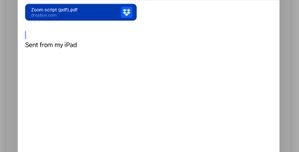
Recipients see a large Dropbox folder icon when I'm sharing files to their email from my iPad.
This is what I sent
this is what was recieved:

DeeAyeVee
11 months agoExplorer | Level 4
No, multiple recipients did not notify me this behavior. It was a promotional package, not an email sent to colleagues, which is why this glitch bothered me. It probably doesn't matter, but when you're trying to make a good first impression, you want things to look good.
I noticed it in my sent box and on another computer pc that I CCed to.
I'm using iOS 18.2.
I can't reproduce the problem.
But basically I tapped share, and copy link, and then I pasted the link into email.
I don't know the version of Dropbox I'm using. Let me see if I can find out.
This is probably nothing you can do at this point. If it happens again I'll let you know.


About Create, upload, and share
Find help to solve issues with creating, uploading, and sharing files and folders in Dropbox. Get support and advice from the Dropbox Community.
The Dropbox Community team is active from Monday to Friday. We try to respond to you as soon as we can, usually within 2 hours.
If you need more help you can view your support options (expected response time for an email or ticket is 24 hours), or contact us on X, Facebook or Instagram.
For more info on available support options for your Dropbox plan, see this article.
If you found the answer to your question in this Community thread, please 'like' the post to say thanks and to let us know it was useful!


