Our Community is in read-only mode until April 8th, learn more here. You can still search existing threads or get help via Dropbox Support, the Dropbox Help Center, or Learn.
Forum Discussion

ggilmore
10 months agoExplorer | Level 4
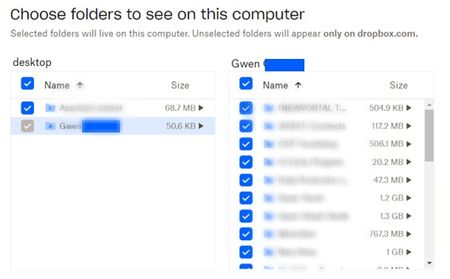
Selective sync shows a folder as grayed out and I can't see some subfolders in my Dropbox folder
Windows 11 - dropbox app is installed and showing it is syncing. I work remotely and share many folders in business dropbox with many other remote agents. Previously had no issues but a few days ag...

Hannah Dropbox Community Moderator
10 months agoDropbox Community ModeratorThanks for bringing this to our attention, ggilmore.
If you close the Dropbox application and then relaunch it, does it make a difference with the folder that's grayed out in your selective sync settings?
If not, try restarting the computer itself.
Also, since you mentioned that you're on a team account, if the above doesn't help, is it possible that your admin changed some settings for the team?
Let me know what you find and we'll go from there.
About Create, Upload, and Share
Find help to solve issues with creating, uploading, and sharing files and folders with Dropbox.
The Dropbox Community team is active from Monday to Friday. We try to respond to you as soon as we can, usually within 2 hours.
If you need more help you can view your support options (expected response time for an email or ticket is 24 hours), or contact us on X, Facebook or Instagram.
For more info on available support options for your Dropbox plan, see this article.
If you found the answer to your question in this Community thread, please 'like' the post to say thanks and to let us know it was useful!


