Our Community is in read-only mode until April 8th, learn more here. You can still search existing threads or get help via Dropbox Support, the Dropbox Help Center, or Learn.
Forum Discussion

ggilmore
10 months agoExplorer | Level 4
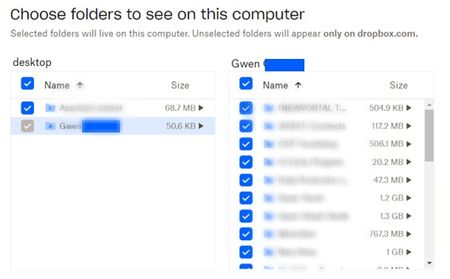
Selective sync shows a folder as grayed out and I can't see some subfolders in my Dropbox folder
Windows 11 - dropbox app is installed and showing it is syncing. I work remotely and share many folders in business dropbox with many other remote agents. Previously had no issues but a few days ag...

ggilmore
10 months agoExplorer | Level 4
thank you, Hannah, for such a quick response! I did as you stated, and it did not solve anything. I rebooted and everything is still as it was. I checked with our admin, and she did not make any changes, and I did confirm that with other team members. No one else is having any such issue.
I look forward to your response!

Nancy Dropbox Community Moderator
10 months agoDropbox Community ModeratorHope it’s alright if I jump in too, ggilmore.
The folder that you see grayed out in your app preferences > Selective sync, does it happen to be your personal member folder?
Since all folders are checked in your selective sync settings, they should also be visible in your local Dropbox folder.
Other than that, I’d like to know the current syncing status and app version.
About Create, Upload, and Share
Find help to solve issues with creating, uploading, and sharing files and folders with Dropbox.
The Dropbox Community team is active from Monday to Friday. We try to respond to you as soon as we can, usually within 2 hours.
If you need more help you can view your support options (expected response time for an email or ticket is 24 hours), or contact us on X, Facebook or Instagram.
For more info on available support options for your Dropbox plan, see this article.
If you found the answer to your question in this Community thread, please 'like' the post to say thanks and to let us know it was useful!


