Our Community is in read-only mode until April 8th, learn more here. You can still search existing threads or get help via Dropbox Support, the Dropbox Help Center, or Learn.
Forum Discussion

ggilmore
10 months agoExplorer | Level 4
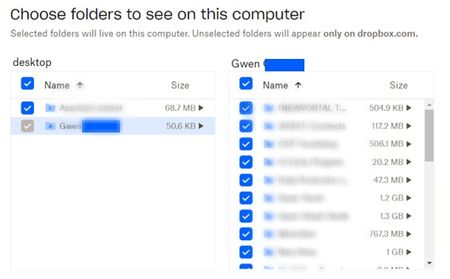
Selective sync shows a folder as grayed out and I can't see some subfolders in my Dropbox folder
Windows 11 - dropbox app is installed and showing it is syncing. I work remotely and share many folders in business dropbox with many other remote agents. Previously had no issues but a few days ag...

ggilmore
10 months agoExplorer | Level 4
But it is the parent folder that is not syncing. It is the one greyed out and because of that, none of the subfolders will sync.
However, I did read the article and confirmed that I had none of those issues. Thank you.
- Nancy10 months ago
Dropbox Community Moderator
I see, thanks for clarifying that. Do you mind sending over one more screenshot of your local Dropbox folder, where the parent folder should be showing exactly? I’d also like one more visual of what you see on your web account, at the same location.
If there are any folder/file names you don’t want us to see, please feel free to hide them before posting your screenshot on the forum.
- ggilmore10 months agoExplorer | Level 4
My list is so extensive, I gave a screenshot of the ones I use the most and where you may see some differentiation. The blue is my web and yellow is thru the app/windows explorer.
- Hannah10 months ago
Hi again, ggilmore, and thanks for the screenshots.
I'm sorry if I missed something, but according to the screenshots, the folders that appear in your local Dropbox folder seem identical to what you see online; should there be some subfolders within those folders, that are not showing up?
If so, can you also check the names of the missing folders, to see if they perhaps have a space at the end of the name? This would also not allow them to sync to your computer.


About Create, Upload, and Share
Find help to solve issues with creating, uploading, and sharing files and folders with Dropbox.
The Dropbox Community team is active from Monday to Friday. We try to respond to you as soon as we can, usually within 2 hours.
If you need more help you can view your support options (expected response time for an email or ticket is 24 hours), or contact us on X, Facebook or Instagram.
For more info on available support options for your Dropbox plan, see this article.
If you found the answer to your question in this Community thread, please 'like' the post to say thanks and to let us know it was useful!


