Our Community is in read-only mode until April 8th, learn more here. You can still search existing threads or get help via Dropbox Support, the Dropbox Help Center, or Learn.
Forum Discussion

ggilmore
10 months agoExplorer | Level 4
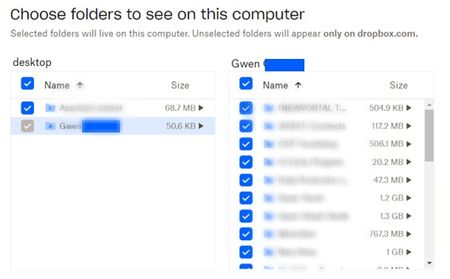
Selective sync shows a folder as grayed out and I can't see some subfolders in my Dropbox folder
Windows 11 - dropbox app is installed and showing it is syncing. I work remotely and share many folders in business dropbox with many other remote agents. Previously had no issues but a few days ag...

Jay Dropbox Community Moderator
10 months agoDropbox Community ModeratorHi ggilmore, thanks for the details. In order to look into this matter in more detail, I'd recommend contacting the support team directly for them to investigate further.

ggilmore2
10 months agoNew member | Level 2
Well that's a bust also! I tried to email support and every time I submit the request, I get an OOPS error. I'm about ready to throw this whole computer away!! lol
So I tried having the company create me a new account under my second work email. All folders were shared to me, I accepted, and my online access is perfect!. however, when i went to set up my desktop app, again, the parent folder is greyed out. So it said it would rename my folder, for whatever reason, and I said yes, and I get this error. What is going on?
bn.BUILD_KEY: Dropbox bn.VERSION: 224.4.4811 bn.constants.WINDOWS_SHELL_EXT_VERSION: 78 bn.is_frozen: True machine_id: 5ae59fc9-4686-461d-9ae7-7788dbc844ff pid: 1656 cwd: 'C:\\Program Files (x86)\\Dropbox\\Client' real_path='C:\\Program Files (x86)\\Dropbox\\Client' mode=0o40777 uid=0 gid=0 parent mode=0o40777 uid=0 gid=0 HOME: None appdata: 'C:\\Users\\mtgwe\\AppData\\Local\\Dropbox\\instance6' real_path='C:\\Users\\mtgwe\\AppData\\Local\\Dropbox\\instance6' mode=0o40777 uid=0 gid=0 parent mode=0o40777 uid=0 gid=0 dropbox_path: None not found parent not found sys_executable: 'C:\\Program Files (x86)\\Dropbox\\Client\\Dropbox.exe' real_path='C:\\Program Files (x86)\\Dropbox\\Client\\Dropbox.exe' mode=0o100777 uid=0 gid=0 parent mode=0o40777 uid=0 gid=0 trace.__file__: 'C:\\Program Files (x86)\\Dropbox\\Client\\224.4.4811\\python-packages.zip\\dropbox\\client\\ui\\common\\boot_error.pyc' real_path='C:\\Program Files (x86)\\Dropbox\\Client\\224.4.4811\\python-packages.zip\\dropbox\\client\\ui\\common\\boot_error.pyc' not found parent not found TMP: C:\Users\mtgwe\AppData\Local\Temp TEMP: C:\Users\mtgwe\AppData\Local\Temp tempdir: 'C:\\Users\\mtgwe\\AppData\\Local\\Temp' real_path='C:\\Users\\mtgwe\\AppData\\Local\\Temp' mode=0o40777 uid=0 gid=0 parent mode=0o40777 uid=0 gid=0 Traceback (most recent call last): File "desktop/dropbox/client/main.py", line 5873, in _setup_root_for_account File "desktop/dropbox/sync_root/helpers.py", line 187, in create_root_for_account File "desktop/dropbox/foundation/futures/basic.py", line 981, in result File "desktop/dropbox/sync_root/manager.py", line 319, in create_root File "desktop/dropbox/sync_root/handlers/windows/cloud_files.py", line 249, in register File "desktop/dropbox/sync_root/handlers/windows/cloud_files.py", line 485, in _register PermissionError: [WinError -2147024891] Access is denied
- Jay10 months ago
The 'access denied' error is generally due to an antivirus or security software on your computer blocking Dropbox from completing the install or startup process.
To see if this is the issue, follow these steps:
- Temporarily disable any antivirus or security programs on your computer.
- Reinstall the Dropbox application.
Let me know how it goes.
About Create, Upload, and Share
Find help to solve issues with creating, uploading, and sharing files and folders with Dropbox.
The Dropbox Community team is active from Monday to Friday. We try to respond to you as soon as we can, usually within 2 hours.
If you need more help you can view your support options (expected response time for an email or ticket is 24 hours), or contact us on X, Facebook or Instagram.
For more info on available support options for your Dropbox plan, see this article.
If you found the answer to your question in this Community thread, please 'like' the post to say thanks and to let us know it was useful!


