Our Community is in read-only mode until April 8th, learn more here. You can still search existing threads or get help via Dropbox Support, the Dropbox Help Center, or Learn.
Forum Discussion

michel Salloum
2 years agoExplorer | Level 4
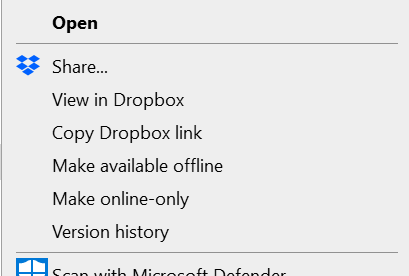
"Send a copy" isn't showing as an option on my Windows context menu
hello folks, i don't see the option of ""Send a copy" in the menu in desktop anymore:

David L.160
2 years agoExplorer | Level 3
I'm having the same issue. I see it on some items but not others. I'm trying to send a WAV file to a client.

Nancy Dropbox Community Moderator
2 years agoDropbox Community ModeratorHey David L.160! Do you mind clarifying the OS version of the device on which you're having this issue?
Also, what's your app version?
- David L.1602 years agoExplorer | Level 3
I'm on Win 10 Pro build 19044.3086.
Dropbox v183.4.7058.
'Send a copy' is something I use almost every day. I rebooted, hoping it would come back but that didn't help.
If I right-click an empty area within the folder, I see a "Send with Dropbox Transfer" and it wants to send the entire folder but if I right-click the file itself, there are no Dropbox context menu items at all.
- Nancy2 years ago
David L.160, can we log a ticket for you then, and look into this internally?
- David L.1602 years agoExplorer | Level 3
Yes. For the record, it works fine on my MacBook.
About Create, Upload, and Share
Find help to solve issues with creating, uploading, and sharing files and folders with Dropbox.
The Dropbox Community team is active from Monday to Friday. We try to respond to you as soon as we can, usually within 2 hours.
If you need more help you can view your support options (expected response time for an email or ticket is 24 hours), or contact us on X, Facebook or Instagram.
For more info on available support options for your Dropbox plan, see this article.
If you found the answer to your question in this Community thread, please 'like' the post to say thanks and to let us know it was useful!


