Your workflow is unique 👨💻 - tell us how you use Dropbox here.
Forum Discussion

skepticalthinker
2 years agoHelpful | Level 6
Shared link asks viewers to request access. Why does this happen?
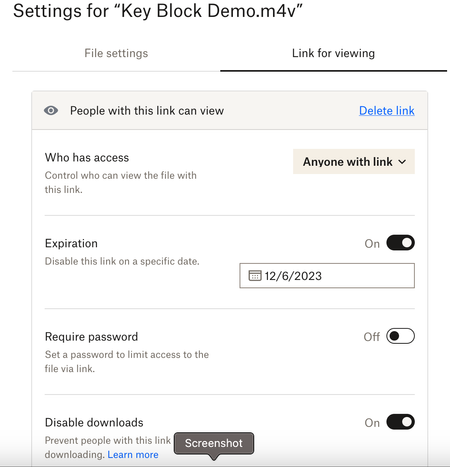
Greetings. I have a shared file set to be viewable by anyone with the link, and I've sent the link to those I want to view the file (see screenshot). However, when they access the link, Dropbox sta...
 2 years ago
Hi skepticalthinker ,
Jumping in here as a Product Manager for Dropbox Sharing to help out Hannah. Reading through your thread, this is very strange indeed. You've done everything right and I appreciate your patience in working through what is no doubt a frustrating experience. The best I can suggest here is to contact support for help. They'll be able to go through your specific situation and troubleshoot your specific link. Sharing a View Link with access set to "Anyone" should allow anyone - signed in or not - to access a web based preview of your content, and then from there to take further collaborative action like downloading, asking to join the content, etc.
Jason

Hannah Dropbox Community Moderator
2 years agoDropbox Community Moderator
skepticalthinker
2 years agoHelpful | Level 6
- Hannah2 years ago
Thanks for checking, skepticalthinker.
Would you mind asking your recipients for a screenshot of what they see, when they click on the link?
- skepticalthinker2 years agoHelpful | Level 6
I’ll see what I can do, Hannah. I think most of them have already requested access and viewed this file, but the next time someone asks for approval, I will post here.
Many thanks again!
- Hannah2 years ago
Not a problem, skepticalthinker!
The thread will remain open, so whenever you can, just get back to us with any updates.
Thanks again and have a great weekend!
- skepticalthinker2 years agoHelpful | Level 6
Hello again, Hannah.
I was finally able to get the screenshot you suggested might be helpful here. It is included below along with some others that illustrate the issue I'm having.
First, as I showed in my initial post, these are the settings for the file in question:
It's set to allow access to anyone with the link, and downloads are disabled.
I've shared the link (via email, not via Dropbox's "Share Link" option) with a number of people. When they click on the link, they receive this notice:
(The person who shared this screenshot with me has a Dropbox account, but I'm not sure if or how many others I've shared the link with do—if that matters.)
I have shared many files in this way—as recently as about a month prior to this one—and recipients never had to do anything beyond clicking the link to be taken directly to the shared file.
When I click on the link to determine "Who Has Access" to the file in question, it lists me, plus the people who have so far requested access. Each is listed as "Can View," but when I view that drop down menu, it notes that these people can download the file despite my disabling that ability as pictured above:
Furthermore, from this same screen, when I move from "People" to "Links," it says that "Anyone with this link can view" (which hasn't been the case):
I hope this might help to determine why recipients must request access even though I have the file set to be viewable to anyone with the link.
Thanks again for your interest in my issue.
- JasonSilverDBX2 years ago
Dropbox Product Manager
Hi skepticalthinker ,
Jumping in here as a Product Manager for Dropbox Sharing to help out Hannah. Reading through your thread, this is very strange indeed. You've done everything right and I appreciate your patience in working through what is no doubt a frustrating experience. The best I can suggest here is to contact support for help. They'll be able to go through your specific situation and troubleshoot your specific link. Sharing a View Link with access set to "Anyone" should allow anyone - signed in or not - to access a web based preview of your content, and then from there to take further collaborative action like downloading, asking to join the content, etc.
Jason
About Create, Upload, and Share
Find help to solve issues with creating, uploading, and sharing files and folders with Dropbox.
The Dropbox Community team is active from Monday to Friday. We try to respond to you as soon as we can, usually within 2 hours.
If you need more help you can view your support options (expected response time for an email or ticket is 24 hours), or contact us on X, Facebook or Instagram.
For more info on available support options for your Dropbox plan, see this article.
If you found the answer to your question in this Community thread, please 'like' the post to say thanks and to let us know it was useful!


