Need to see if your shared folder is taking up space on your dropbox 👨💻? Find out how to check here.
Forum Discussion

priester68
9 months agoNew member | Level 1
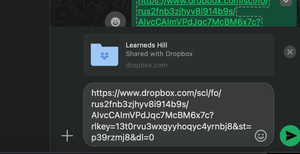
Shared link via WhatsApp shows wrong name
Not sure what's happening here, but when I go to share a link to a dropbox folder to my WhatsApp group, it says Learned's Hill Shared with Dropbox. My account is not Learneds Hill and I can't figure...

Walter Dropbox Community Moderator
9 months agoDropbox Community ModeratorHey priester68 - sorry to hear you're having issues with this.
Can you please let me know if this happens with a shared link to a specific folder or if it's affecting all of the shared links you try to share this way?
Are you the owner of the folder(s) you're sharing links to?
While we're at it, have you tried closing the wrong name by using the "X" button right next to it and it comes back?
Let me know more information and we'll take it from there.

priester68
9 months agoNew member | Level 1
It appears to only be happening with this one folder.
I am the owner
Yes I can close it out using the x and when i share it it's not there, but since I've seen it, I want it to go away and can't figure out why it won't.
- Hannah9 months ago
Thanks for the update, priester68, this is indeed a strange case.
If you delete the link for this folder from your links page and then create a new one, does this behavior persist with the new link as well?
- priester689 months agoNew member | Level 1
Youre getting close. So in the links page I found this Learneds Hill folder thing and when I deleted it and went back to share the folder again, it reappeared. ?????
- Jay9 months ago
Hi priester68, could you unshare the folder completely using these steps (meaning everyone will leave that folder), rename the folder, and then reshare it?
- priester689 months agoNew member | Level 1
I'm not gonna hold my breath, but I think that did it. I'll keep checking and let y'all know if it comes back. 🤞


About Create, upload, and share
Find help to solve issues with creating, uploading, and sharing files and folders in Dropbox. Get support and advice from the Dropbox Community.
The Dropbox Community team is active from Monday to Friday. We try to respond to you as soon as we can, usually within 2 hours.
If you need more help you can view your support options (expected response time for an email or ticket is 24 hours), or contact us on X, Facebook or Instagram.
For more info on available support options for your Dropbox plan, see this article.
If you found the answer to your question in this Community thread, please 'like' the post to say thanks and to let us know it was useful!


