Our Community is in read-only mode until April 8th, learn more here. You can still search existing threads or get help via Dropbox Support, the Dropbox Help Center, or Learn.
Forum Discussion

Andrew1705
1 year agoExplorer | Level 3
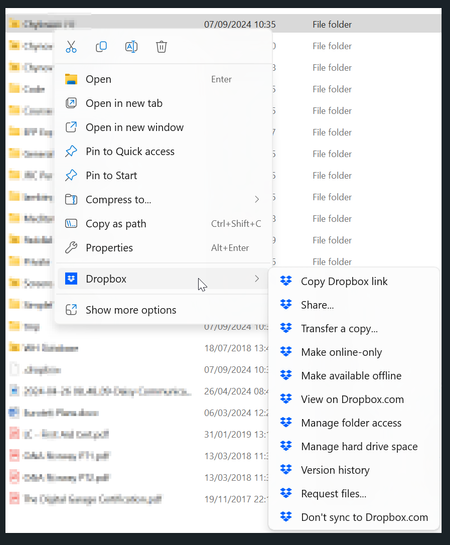
The context menu is missing in my Windows device.
Hi,
I've been having problems with this for months and have tried uninstalling and reinstalling several times along with anything else I can find - checking the registry entries to make sure Dr...

Nancy Dropbox Community Moderator
1 year agoDropbox Community ModeratorHi from me as well, Andrew! Since you seem to have checked everything else, can you also take a look at this article and make sure UAC is set to default levels?

Andrew1705
1 year agoExplorer | Level 3
Hi Nancy , unfortunately that didn't make any difference either and I also tried shutting down DropBox then restarting with 'Run as Adminstrator'. I am a local administrator on the PC as well.
- Megan1 year ago
As a last resort, would you mind trying out these steps if you haven't already Andrew1705?
- Andrew17051 year agoExplorer | Level 3
Hi Megan I've just tried that again (although I had done that already over the weekend). As last time the first time I right click after installing DropBox the menu's were there and when I clicked away from the menu and right clicked on the folder again the DropBox items had disappeared.
- Nancy1 year ago
Hi again, Andrew. Can you send me one more screenshot of the options you see now, when right-clicking on your Dropbox files?
Other than that, I’d like you to temporarily disable iDrive and OneDrive (based on what I see on your second screenshot). Does that make any difference?

About Create, Upload, and Share
Find help to solve issues with creating, uploading, and sharing files and folders with Dropbox.
The Dropbox Community team is active from Monday to Friday. We try to respond to you as soon as we can, usually within 2 hours.
If you need more help you can view your support options (expected response time for an email or ticket is 24 hours), or contact us on X, Facebook or Instagram.
For more info on available support options for your Dropbox plan, see this article.
If you found the answer to your question in this Community thread, please 'like' the post to say thanks and to let us know it was useful!


