Our Community is in read-only mode until April 8th, learn more here. You can still search existing threads or get help via Dropbox Support, the Dropbox Help Center, or Learn.
Forum Discussion

p aplin vft
1 year agoHelpful | Level 5
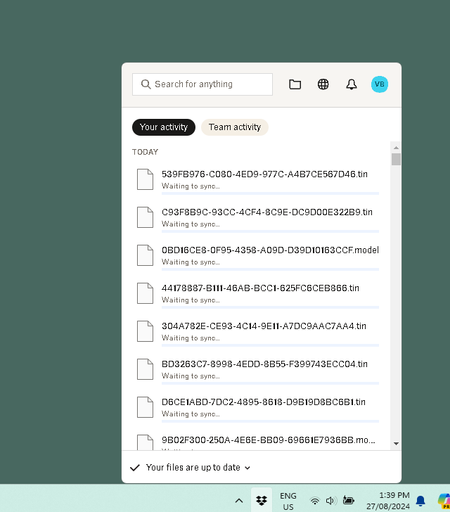
The desktop app shows it's up to date, even though files are still waiting to sync.
The Dropbox Task bar App shows that that the Sync is complete in the status bar, however items are continuing to download, upload and show as Waiting for Sync.
Why is this basic function not co...

Nancy Dropbox Community Moderator
1 year agoDropbox Community ModeratorThanks for bringing this to our attention, p aplin vft.
If you open your local Dropbox folder, do you see any blue rotating syncing icons next to any of your files/folders?
Besides the syncing status of your app, I’d also like to know its app version. Is this something you started noticing after a recent update, by any chance?
Let me know more info, and we’ll take a look.
 p aplin vft1 year agoHelpful | Level 5
Hi Nancy,
Version is v206.4.6506
Not a new issue no, one of many.
- Hannah1 year ago
Hey p aplin vft, if you haven't already, can you restart your computer, to see if that helps?
- p aplin vft1 year agoHelpful | Level 5
Hi Hannah,
This has been happening over months, on 5 different Windows Machines, etc.
Safe to assume the computer has been retarted a few times...

About Create, Upload, and Share
Find help to solve issues with creating, uploading, and sharing files and folders with Dropbox.
The Dropbox Community team is active from Monday to Friday. We try to respond to you as soon as we can, usually within 2 hours.
If you need more help you can view your support options (expected response time for an email or ticket is 24 hours), or contact us on X, Facebook or Instagram.
For more info on available support options for your Dropbox plan, see this article.
If you found the answer to your question in this Community thread, please 'like' the post to say thanks and to let us know it was useful!


