Our Community is in read-only mode until April 8th, learn more here. You can still search existing threads or get help via Dropbox Support, the Dropbox Help Center, or Learn.
Forum Discussion

ke820
8 months agoExplorer | Level 4
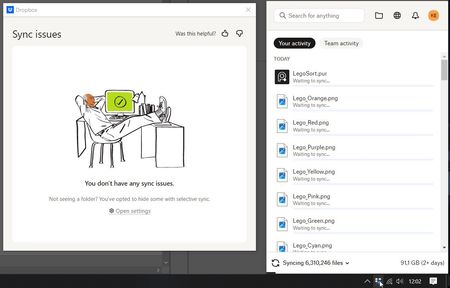
The Dropbox app started syncing all of my files, after I deleted a %temp% file.
syncing is not works properly, I reinstalled app after this problem but still problem stay same.

Neal Community Manager
8 months agoCommunity ManagerApologies t4ngml, they hyperlink was missing from my response but I've added it in now.
Here it is again just to be sure.

t4ngml
8 months agoHelpful | Level 7
Hi
The indexing finally resumed a few hours later. But yesterday, a new one started and it's still running!
Currently, I've closed all other apps (besides tis browser), the fan is spinning, my laptop is burning, and runs slowly.
Questions:
- Is it related with the discussed update, or to a new one, or a fix of the first one?
- Shall we expect futrther reindexing soon? On a regular basis?
- If it's just about re-indexing, why the need for so much data transfer? Does it actually download the data again?!
You guys should communicate on what's actually going with your service. Some maintenance can be required, and it's OK. But you can't leave people waiting for your software to fix its issues in the dark, without warning us it's going to happen, without giving us the choice to run it now or later on (without the need to close the software). Especially if there are chances you need to do it multiple times.
Because in the meatime, we're just stuck waiting or our cloud software and data to be ready again, preventing us from working efficiently.


About Create, Upload, and Share
Find help to solve issues with creating, uploading, and sharing files and folders with Dropbox.
The Dropbox Community team is active from Monday to Friday. We try to respond to you as soon as we can, usually within 2 hours.
If you need more help you can view your support options (expected response time for an email or ticket is 24 hours), or contact us on X, Facebook or Instagram.
For more info on available support options for your Dropbox plan, see this article.
If you found the answer to your question in this Community thread, please 'like' the post to say thanks and to let us know it was useful!


