Your workflow is unique 👨💻 - tell us how you use Dropbox here.
Forum Discussion

gunrunnerjohn
5 months agoHelpful | Level 6
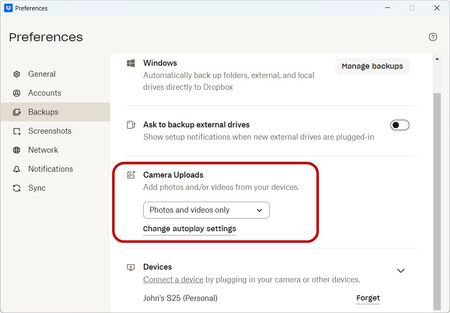
The Dropbox desktop app no longer automatically syncs new photos from my phone
Device Samsung S25 Operating System/Browser (if using the web) Windows 11 Pro / Firefox Dropbox App Version (if using the app) 234.4.5591 Syncing Status Up To Date
Question or Issue For the...
 5 months ago
Well, I uninstalled everything about Dropbox on the phone, rebooted the phone and cleared the cache partition, and then installed Dropbox again.
That seems to have gotten it's mind right, now it's back to the normal behavior. Don't know what it was confused about, hopefully this was the cure.
gunrunnerjohn
5 months agoHelpful | Level 6
Well, I uninstalled everything about Dropbox on the phone, rebooted the phone and cleared the cache partition, and then installed Dropbox again.
That seems to have gotten it's mind right, now it's back to the normal behavior. Don't know what it was confused about, hopefully this was the cure.

Theresa Community Manager
5 months agoCommunity ManagerHi there gunrunnerjohn , and welcome to the Dropbox Community 👋
I’m really glad to hear everything is working again and thanks so much for coming back to update us! It’s always helpful when folks share that their issue is resolved, especially with syncing problems like this that can be tricky. 😊
By the way, I’m Theresa 👩💻, one of the Community Managers here at Dropbox HQ. Since you’ve been depending on Dropbox to sync your photos, I’d love to know… what’s your favourite Dropbox feature? Whether it’s about syncing, sharing, or something else entirely, I’m always curious what people enjoy most.
Looking forward to hearing more,
T 😺 (Dropbox Community Manager)
About Create, Upload, and Share
Find help to solve issues with creating, uploading, and sharing files and folders with Dropbox.
The Dropbox Community team is active from Monday to Friday. We try to respond to you as soon as we can, usually within 2 hours.
If you need more help you can view your support options (expected response time for an email or ticket is 24 hours), or contact us on X, Facebook or Instagram.
For more info on available support options for your Dropbox plan, see this article.
If you found the answer to your question in this Community thread, please 'like' the post to say thanks and to let us know it was useful!


