Need to see if your shared folder is taking up space on your dropbox 👨💻? Find out how to check here.
Forum Discussion

neillan6
3 years agoExplorer | Level 4
Unable to fix sync issue
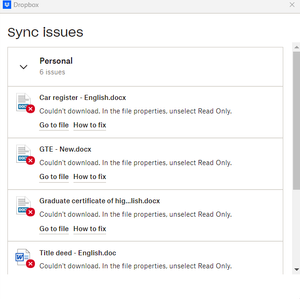
I have 6 sync issues, but not being able to fix. If I clicked 'go to file', it will take me the default document folder in windows 11, not being able to identify these files. These 6 sync issues are...
- 3 years ago
Can you download them from the website, then delete them from their location and then drag and drop them to their location through the Dropbox folder, to see if that helps?

Hannah Dropbox Community Moderator
3 years agoDropbox Community ModeratorHey neillan6, thanks for reaching out to us today.
If you search your entire Dropbox folder, are you able to locate these files?
And if so, can you please move them out of the Dropbox folder and back in, to see if that helps?
If you can't find them in the Dropbox folder, are you able to find them in your account online?
Let me know and we'll go from there.
 neillan63 years agoExplorer | Level 4I located them online, not in local folder. What should I do next?
- Hannah3 years ago
Can you download them from the website, then delete them from their location and then drag and drop them to their location through the Dropbox folder, to see if that helps?
- neillan63 years agoExplorer | Level 4It worked 🙂
About Create, upload, and share
Find help to solve issues with creating, uploading, and sharing files and folders in Dropbox. Get support and advice from the Dropbox Community.
The Dropbox Community team is active from Monday to Friday. We try to respond to you as soon as we can, usually within 2 hours.
If you need more help you can view your support options (expected response time for an email or ticket is 24 hours), or contact us on X, Facebook or Instagram.
For more info on available support options for your Dropbox plan, see this article.
If you found the answer to your question in this Community thread, please 'like' the post to say thanks and to let us know it was useful!


