Our Community is in read-only mode until April 8th, learn more here. You can still search existing threads or get help via Dropbox Support, the Dropbox Help Center, or Learn.
Forum Discussion

mathijsw
1 month agoExplorer | Level 4
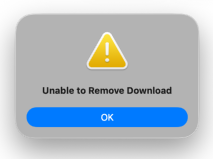
We're getting a "Unable to remove download" error when selecting the online-only option.
Device
(Macbook Pro M2) Operating System/Browser (if using the web)
(macOS 26.3) Dropbox App Version/Browser Version
(243.3.6933)
Issue We are using Dropbox via File Provide...

mathijsw
1 month agoExplorer | Level 4
Thank you for all your help, I really appreciate it.
My test VM, on which I recorded the screencast, is running version 242.4.5815. I think its the lastest stable, right?
Sync status is complete on every action I take.
I do have to admit that after a certain amount of time, it can be switched to Online-Only. Maybe my customer just needs to be a bit more patient. The issue is more noticeable when you quickly perform the action to make something local and then switch it back to Online-Only.
- Megan30 days ago
Dropbox Community Moderator
Hey mathijsw!
I'd like to ask how long you noticed waiting helped with the error? Are we talking 30secs, 1 min or more?
Have you checked the bandwidth settings in the desktop app to ensure that there aren't any limits on the upload speed and to ensure that things can be synced as quickly as possible?
It's also important to keep in mind that, if it's indeed not a long time that it then allows you to make the files offline without the error, it might be that on the client's side, the app hasn't finished syncing yet. It would be good to know if your client who's reporting the issue is also seeing everything up to date before trying to make the file online only and getting the error.

About Create, Upload, and Share
Find help to solve issues with creating, uploading, and sharing files and folders with Dropbox.
The Dropbox Community team is active from Monday to Friday. We try to respond to you as soon as we can, usually within 2 hours.
If you need more help you can view your support options (expected response time for an email or ticket is 24 hours), or contact us on X, Facebook or Instagram.
For more info on available support options for your Dropbox plan, see this article.
If you found the answer to your question in this Community thread, please 'like' the post to say thanks and to let us know it was useful!


