Our Community is in read-only mode until April 8th, learn more here. You can still search existing threads or get help via Dropbox Support, the Dropbox Help Center, or Learn.
Forum Discussion

rfog
5 years agoCollaborator | Level 9
White cross in some files in Windows 10
Take a look to the next capture:
What that white cross means? Files are in local, and I have that cross in most of my local files. They work, they sync, but they have the cross, and I haven'...
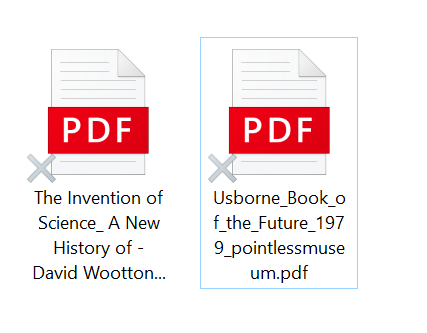
- 5 years ago
Hi rfog, thanks for messaging the Community!
It looks like you might have Smart Sync enabled on your account, and possibly have other apps on your machine which use overlay icons. This could include cloud providers and other syncing apps.
Try temporarily quitting them to see if this helps revert the Dropbox sync icons.
Keep me posted!

Jay Dropbox Community Moderator
5 years agoDropbox Community ModeratorHi rfog, thanks for messaging the Community!
It looks like you might have Smart Sync enabled on your account, and possibly have other apps on your machine which use overlay icons. This could include cloud providers and other syncing apps.
Try temporarily quitting them to see if this helps revert the Dropbox sync icons.
Keep me posted!
- rfog5 years agoCollaborator | Level 9
Jay ,
I have 3 :innocent: Drobpox, OneDrive and iCloudDrive. I think iCloud Drive does not use overlays, but OneDrive uses them. Once I closed OneDrive, all overlays dissapeard, from OneDrive folders and from Dropbox. Could be that. If is only cosmetic issues, I don't mind.
Thanks.
- Jay5 years ago
It is mainly cosmetic, though it can interfere in seeing if files are syncing or up to date.
If you're not using any of those apps, try disabling them permanently or upon startup, so that Dropbox would be able to show the icons.
About Create, Upload, and Share
Find help to solve issues with creating, uploading, and sharing files and folders with Dropbox.
The Dropbox Community team is active from Monday to Friday. We try to respond to you as soon as we can, usually within 2 hours.
If you need more help you can view your support options (expected response time for an email or ticket is 24 hours), or contact us on X, Facebook or Instagram.
For more info on available support options for your Dropbox plan, see this article.
If you found the answer to your question in this Community thread, please 'like' the post to say thanks and to let us know it was useful!


