Our Community is in read-only mode until April 8th, learn more here. You can still search existing threads or get help via Dropbox Support, the Dropbox Help Center, or Learn.
Forum Discussion

JCRCAN
2 years agoExplorer | Level 3
Why are my files outside the Dropbox folder being synced to Dropbox?
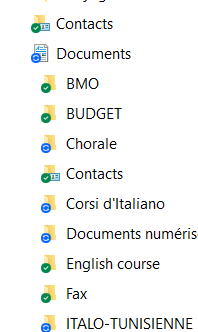
Why unexpectidly, all my files appear with the Dropbox logo icon on my PC, as shown below?
- 2 years ago
Hi JCRCAN, thanks for messaging the Community!
It looks like you might have activated the Dropbox Backup feature on your account, since the Documents folder shows the sync icon.
You can disable it by following these steps.
If you need any further assistance, please let me know!

Jay Dropbox Community Moderator
2 years agoDropbox Community ModeratorCould you check to see if the backup is visible on the Dropbox site instead, and if you can disable it from there?

JCRCAN
2 years agoExplorer | Level 3
Yes I can see my Document directory on the DropBox site as shown below:
And when I enter in th Backup page this is what I am invited to do:
- JCRCAN2 years agoExplorer | Level 3
You must absolutly solve this unacceptable situation. I don't have control on my own PC environment!
I don't what to use Dropbx anymore! It is a mess!
- Walter2 years ago
Hey JCRCAN - sorry to jump in here, but could you clarify what happens when you click on the 'C'est parti !' button shown in your second screenshot?
Also, if you have the Dropbox desktop app installed and running on your computer at the moment, could you take a look at the backups tab in the app's preferences and let me know if you're able to disable your backups from there?
- JCRCAN2 years agoExplorer | Level 3
Here is what I got from the "C'est parti" button and the next "Plus f'info" button:

About Create, Upload, and Share
Find help to solve issues with creating, uploading, and sharing files and folders with Dropbox.
The Dropbox Community team is active from Monday to Friday. We try to respond to you as soon as we can, usually within 2 hours.
If you need more help you can view your support options (expected response time for an email or ticket is 24 hours), or contact us on X, Facebook or Instagram.
For more info on available support options for your Dropbox plan, see this article.
If you found the answer to your question in this Community thread, please 'like' the post to say thanks and to let us know it was useful!


