Your workflow is unique 👨💻 - tell us how you use Dropbox here.
Forum Discussion

M1000 ..
6 months agoHelpful | Level 6
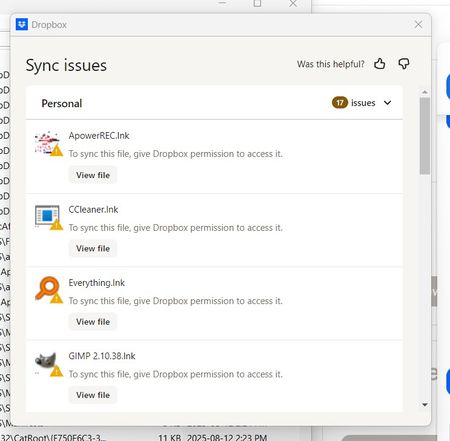
Why do I need to give Dropbox permission to sync .lnk files on Windows?
Hello,
i have tried to find the answer but I have not.
How do i fix this?
Dropbox says 'fix permission'
What am I suppose to do?
Thank you
 6 months ago
Hello,
Im sorry, I still don't understand.
I uninstalled ApowerRed because Ive never used it.
Ccleaner - Its not installed. Those are remnants when I did have it. But the four items are all in Dropbox.
Greenshot - its not installed
I spoke with Dropbox yesterday and they gave me these directions . . .
- Make sure the Dropbox desktop application is running.
- Click on the Dropbox icon in the system tray and then click your profile picture or initials.
- Select Preferences.
- Click on the Account tab, and then click in the window under the tab (just anywhere will do).
- Press the alt+H keys.
- Click Fix Hardlinks.
- You may be prompted for your username and password. These are your computer login credentials, not your Dropbox account credentials.
- Please wait about ten minutes to see if Dropbox resumes syncing.
If the above steps don’t resolve the issue, please repeat steps 1 through 5, but at step 6, this time click Fix Permissions. Operating system permissions can prevent files from being viewed or edited by unauthorized logins. Permissions can be set any number of ways and can be restored manually through a fairly simple process.
Please note that if you click Fix Permissions, syncing will start back over. If you need to use this step, please allow for a few hours to pass and let me know if syncing becomes stuck again.I did as exp
I ended up uninstalling the programs with the problems.
Dropbox is up to date

Hannah Dropbox Community Moderator
6 months agoDropbox Community ModeratorHey M1000 .., I hope it's okay for me to jump in here as well.
So, from what I can tell from your screenshots, it looks like you have lots of shortcuts of files and apps in your Dropbox folder.
These are basically just pointers in Windows that point to the original files. The Dropbox app can't follow these links, so you'll need to place the original files into your Dropbox folder if you want to sync them.
Also, keep in mind that the app folders or app shortcuts will not work as you'd expect, meaning, syncing these shortcuts won't allow you to install those apps on other devices.
I hope this clarifies things.
M1000 ..
6 months agoHelpful | Level 6
Hello,
Im sorry, I still don't understand.
I uninstalled ApowerRed because Ive never used it.
Ccleaner - Its not installed. Those are remnants when I did have it. But the four items are all in Dropbox.
Greenshot - its not installed
I spoke with Dropbox yesterday and they gave me these directions . . .
- Make sure the Dropbox desktop application is running.
- Click on the Dropbox icon in the system tray and then click your profile picture or initials.
- Select Preferences.
- Click on the Account tab, and then click in the window under the tab (just anywhere will do).
- Press the alt+H keys.
- Click Fix Hardlinks.
- You may be prompted for your username and password. These are your computer login credentials, not your Dropbox account credentials.
- Please wait about ten minutes to see if Dropbox resumes syncing.
If the above steps don’t resolve the issue, please repeat steps 1 through 5, but at step 6, this time click Fix Permissions. Operating system permissions can prevent files from being viewed or edited by unauthorized logins. Permissions can be set any number of ways and can be restored manually through a fairly simple process.
Please note that if you click Fix Permissions, syncing will start back over. If you need to use this step, please allow for a few hours to pass and let me know if syncing becomes stuck again.
I did as exp
I ended up uninstalling the programs with the problems.
Dropbox is up to date
- Theresa5 months ago
Community Manager
Hi M1000 .. and welcome back to the Dropbox Community! I’m really glad to hear things are working as expected now and thank you for coming back to share that update. Your follow-up is super helpful for others who might have questions about syncing .lnk files on Windows ✨.
I’m Theresa 👩💻, one of the Community Managers here at Dropbox. Since you’re diving into file types and permissions, I’d love to know... do you have a favourite Dropbox feature that helps you stay in control of how your files sync or behave?
Looking forward to hearing more,
T 😺 (Dropbox Community Manager)


About Create, Upload, and Share
Find help to solve issues with creating, uploading, and sharing files and folders with Dropbox.
The Dropbox Community team is active from Monday to Friday. We try to respond to you as soon as we can, usually within 2 hours.
If you need more help you can view your support options (expected response time for an email or ticket is 24 hours), or contact us on X, Facebook or Instagram.
For more info on available support options for your Dropbox plan, see this article.
If you found the answer to your question in this Community thread, please 'like' the post to say thanks and to let us know it was useful!


