Your workflow is unique 👨💻 - tell us how you use Dropbox here.
Forum Discussion

Jeungmin t.
9 years agoNew member | Level 1
Cannot get file larger than 2gb. I'm a Dropbox Pro user!
I'm using Dropbox Pro ([account information removed]), and I really need to get large file (several few gbs files) as soon as possible. (Please refer: [file request link removed])
Since I'm a Dropbox Pro user, I thought I'm expected to be able to receive files larger than 2gb (up to 10 gb) as your document suggests: https://www.dropbox.com/en/help/9090.
However, when my clients tried to upload their files, it keeps saying that the limitation for file request is 2gb. I'm ahead of very important business deadline, so I really need you guys to figure out how to get my files.
This is not what I paid for!
Open a ticket with Dropbox Support.
Open your ticket here: https://www.dropbox.com/support
Track your ticket here: https://dropbox.zendesk.comReplies take approximately 1 - 3 business days with Pro users getting priority (longer for Basic users).

9 Replies
Replies have been turned off for this discussion
- Rich9 years ago
Super User II
Open a ticket with Dropbox Support.
Open your ticket here: https://www.dropbox.com/support
Track your ticket here: https://dropbox.zendesk.comReplies take approximately 1 - 3 business days with Pro users getting priority (longer for Basic users).
 Sarah79 years agoNew member | Level 2Did you ever get an answer to this??? I didn't to my request, have tried several outside apps to no avail, am ready to make full jump to Google Drive.
- Zed9 years ago
Dropbox Staff
Hello Sarah,
As Rich suggested, please go to www.dropbox.com/support and submit a ticket request so that our support team can investigate what is causing the issue.
Once you do, please let us know here with the ticket number ID.
Thank you.
 g026 years agoNew member | Level 2
Hello,
Any update on this? I see that the file size limits have been removed from the link posted by Jeungmin. So, pro users can not receive files larger than 2gb?
- Walter6 years ago
Dropbox Community Moderator
Of course they can g02.
Are you having any specific issues with our File Requests feature?
If so, could you provide some additional information or screeenshots of any errors you might be getting that might help our investigation?
Thanks!
- g026 years agoNew member | Level 2
Hi Walter,
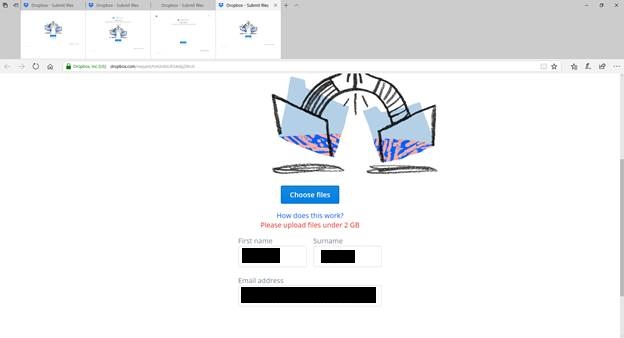
Yes, the person that I have sent the file reqeust to receives the following error when trying to upload: Please upload files under 2 GB. See screenshot below.
- Walter6 years ago
Is it possible that you're not on the Professional plan then g02 ?
I'm only asking as submitters can send files up to 2 GB if the File Request was created by a Dropbox Basic or Plus account while this goes up to 20 GB when the File Request was created by a Business or Professional account.
I hope this clears things up a tad and I'll wait for your response in case I'm missing something.
- g026 years agoNew member | Level 2
Yes, looks like I am a plus user and not a pro user. I couldn't find the upload file size limits described anywhere on your website. Where can I find a description of the features of my service?
- Walter6 years ago
Glad we could clear this up g02!
As per your concern now, please have a look below:
https://help.dropbox.com/files-folders/share/received-file-request
For more information on our Plus plan please take a look here:
https://help.dropbox.com/accounts-billing/plans-upgrades/dropbox-plus
Or even here: https://www.dropbox.com/plans
I hope this helped!


About Storage Space
Looking for help with managing the storage space in your Dropbox account? Talk to the Dropbox Community and get advice from members.
The Dropbox Community team is active from Monday to Friday. We try to respond to you as soon as we can, usually within 2 hours.
If you need more help you can view your support options (expected response time for an email or ticket is 24 hours), or contact us on X, Facebook or Instagram.
For more info on available support options for your Dropbox plan, see this article.
If you found the answer to your question in this Community thread, please 'like' the post to say thanks and to let us know it was useful!


