We’re Still Here to Help (Even Over the Holidays!) - find out more here.
Forum Discussion

Mutual Friends
11 months agoNew member | Level 1
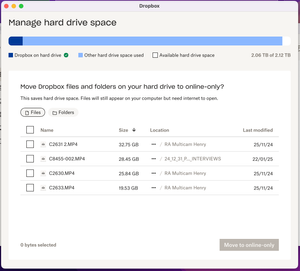
Dropbox says it can't sync due to insufficient disk space on my Mac, but I have more than enough.
Dropbox is saying it cannot sync files to my desktop with a;
'Can't sync, not enough free disc space' warning
Although my desktop has over 1TB of free space
No backups are taking up space, cach...
 11 months ago
Hi there Nancy
Thanks for the swift reply - it turned out to be old Time Machine lookups that Dropbox was still registering.
Had to clear them manually via Terminal but seems to have done the trick!
Mutual Friends
11 months agoNew member | Level 1
Hi there Nancy
Thanks for the swift reply - it turned out to be old Time Machine lookups that Dropbox was still registering.
Had to clear them manually via Terminal but seems to have done the trick!

Theresa Community Manager
11 months agoCommunity ManagerHi Mutual Friends and welcome to the Dropbox Community 😊. I’m so glad to see you’ve resolved your storage space issue and can now save the files you need without any hassle.
On a separate note, I’m Theresa, a Community Manager here at Dropbox 👩💻. I’d love to hear how you use Dropbox that's if you’re open to sharing. I’d be excited to learn your Dropbox story 💌. You never know, we might have some tips or tricks to help you make the most of Dropbox and its features 💡✨.
Hope to hear from you soon 🤗,
T 😸(Dropbox Community Manager)
About Storage Space
Looking for help with managing the storage space in your Dropbox account? Talk to the Dropbox Community and get advice from members.
The Dropbox Community team is active from Monday to Friday. We try to respond to you as soon as we can, usually within 2 hours.
If you need more help you can view your support options (expected response time for an email or ticket is 24 hours), or contact us on X, Facebook or Instagram.
For more info on available support options for your Dropbox plan, see this article.
If you found the answer to your question in this Community thread, please 'like' the post to say thanks and to let us know it was useful!


