Your workflow is unique 👨💻 - tell us how you use Dropbox here.
Forum Discussion

conalwn
2 years agoHelpful | Level 5
Getting a 'not enough Dropbox space' error, when I have plenty of space
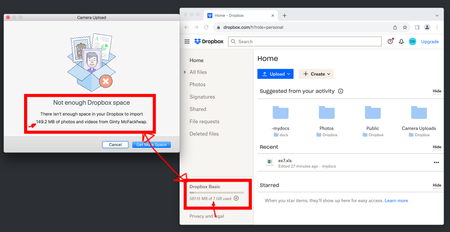
Everyday I get this (see screenshot) on Mac Os when connecting any device to sync photos. "Not enough dropbox space" - Mac - But I have PLENTY of space.. and I see it on both of my macs but not my ip...
 2 years ago
Hi conalwn,
I'm happy to hear that everything is back in working order! It's possible that your cache wasn't properly clearing upon signing out and back in, which is the usual operation that would clear out the cached files causing this error message. This problem seems to have resolved itself while we were investigating.
For anyone else receiving this error message, sign out, then sign back in to clear your cached files. If that doesn't work, please let me know and we can take a deeper look!
Regards,
Ben

Jay Dropbox Community Moderator
2 years agoDropbox Community ModeratorThanks for the image, if you click the notification bell at the top, what message do you see there?

Gladya1
2 years agoExplorer | Level 3
By the way. When I clicked to SEND the message .. that big storage banner flickered on the screen again then disappeared. It's trolling me! lol
 conalwn2 years agoHelpful | Level 5
Any updates?
I'm still unable to sync using the mac client. I'm using 3% of 7GB but can't sync 30MB of images as dropbox says "you don't have enough space".
And by the way it's definitely the dropbox client and not the mac because I ALSO see this behaviour on my other mac.
Today, if I clear dropbox out completely to 0%, the sync also fails...
Not a very good piece of software if the core functionality fails at the first hurdle.. I mean 'why' would I upgrade if even this basic functionality is failing?
- Gladya12 years agoExplorer | Level 3I received an email that there was an update to my post. I can’t find that update. Since I don’t get the upgrade banner anymore.. I’m good. Thank you for your help.
- conalwn2 years agoHelpful | Level 5
Glad you're sorted.
Im still awaiting a response from dropbox support.
- Megan2 years ago
Hey all, thanks for bringing this to our attention!
Out team keeps an eye on this, and we will let you know more about this, once we have further news.
Thanks again!

About Storage Space
Looking for help with managing the storage space in your Dropbox account? Talk to the Dropbox Community and get advice from members.
The Dropbox Community team is active from Monday to Friday. We try to respond to you as soon as we can, usually within 2 hours.
If you need more help you can view your support options (expected response time for an email or ticket is 24 hours), or contact us on X, Facebook or Instagram.
For more info on available support options for your Dropbox plan, see this article.
If you found the answer to your question in this Community thread, please 'like' the post to say thanks and to let us know it was useful!


