Need to see if your shared folder is taking up space on your dropbox 👨💻? Find out how to check here.
Forum Discussion

jst601
9 months agoNew member | Level 2
I can't access shared folder due to lack of storage space - do I need to upgrade?
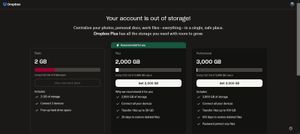
I use dropbox occasionally. I have a free account, one I've had for years. This morning I logged in to access some files a friend shared w/me & dropbox will not let me access it unless I upgrade to s...
 9 months ago
I see it now. Apologies. The folder size the guy is sending is 4G. 🤦♂️

Cachehit
6 months agoNew member | Level 2
I have the same issue. The folder being shared is also 4G. But I am unclear on the model here. Someone else is sharing their storage with me. Why do I need my own storage, even for editing it. Is that the model? I have to pay for storage before I can edit someone's files?
I see the option to share a read-only copy, but I do want edit permission.

Mark Super User II
6 months agoSuper User IICachehit wrote:Why do I need my own storage, even for editing it. Is that the model? I have to pay for storage before I can edit someone's files?
Basically, yes, if the folder is larger than your free space.
You get 2gb free space to start with (it can be higher via referrals etc.). If you need access to more than that you need to pay - even if its to access another users shared folder and regardless of if they pay or not.
About Storage Space
Looking for help with managing the storage space in your Dropbox account? Talk to the Dropbox Community and get advice from members.
The Dropbox Community team is active from Monday to Friday. We try to respond to you as soon as we can, usually within 2 hours.
If you need more help you can view your support options (expected response time for an email or ticket is 24 hours), or contact us on X, Facebook or Instagram.
For more info on available support options for your Dropbox plan, see this article.
If you found the answer to your question in this Community thread, please 'like' the post to say thanks and to let us know it was useful!


