Need to see if your shared folder is taking up space on your dropbox 👨💻? Find out how to check here.
Forum Discussion

rmhines
4 months agoNew member | Level 2
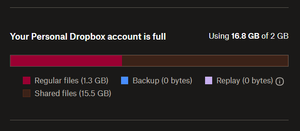
I'm out of space. However, the content isn't mine - it is shared.
Dropbox Plan N/A Device N/A Operating System/Browser (if using the web) N/A Dropbox App Version (if using the app) N/A
Dropbox indicates I'm out of space, but that's only true if you count t...

Megan Dropbox Community Moderator
4 months agoDropbox Community ModeratorHi there, rmhines, let's jump right into this!
If you have edit access to the folder, it'd need to take up space in your account as well, so that you can edit it.
Keep in mind that if you no longer need the folder or its content, you can remove your own access by following the steps here.
Otherwise, you can always access a folder without affecting your own space. You'd have to ask the owner to send you a "view-only" link instead.
And lastly, if you need to upload files to someone else's account, they can also send you a file request, which won't affect your space either. In any case I'll forward your feedback to the appropriate areas so we can continue to improve.
I hope this helps!
About Storage Space
Looking for help with managing the storage space in your Dropbox account? Talk to the Dropbox Community and get advice from members.
The Dropbox Community team is active from Monday to Friday. We try to respond to you as soon as we can, usually within 2 hours.
If you need more help you can view your support options (expected response time for an email or ticket is 24 hours), or contact us on X, Facebook or Instagram.
For more info on available support options for your Dropbox plan, see this article.
If you found the answer to your question in this Community thread, please 'like' the post to say thanks and to let us know it was useful!


