Need to see if your shared folder is taking up space on your dropbox 👨💻? Find out how to check here.
Forum Discussion

rmhines
4 months agoNew member | Level 2
I'm out of space. However, the content isn't mine - it is shared.
Dropbox Plan N/A Device N/A Operating System/Browser (if using the web) N/A Dropbox App Version (if using the app) N/A
Dropbox indicates I'm out of space, but that's only true if you count t...
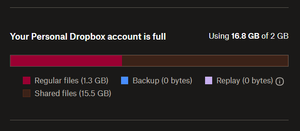

rmhines
4 months agoNew member | Level 2
An incremental charge might be fair. A total duplication is not.
While I appreciate solution suggestions, I'm not interested in paths that require me to negotiate special conditions with other parties - that's just life-sucking friction. Dropbox is supposed to be friction reducing.
Appreciate if the product management team is fully aware of this awkward situation.

Mark Super User II
4 months agoSuper User IIrmhines wrote:Appreciate if the product management team is fully aware of this awkward situation
They are - its been like this since its inception and previous official communication is that there is no plans to change it.
Obviously I dont work for Dropbox and things can change, but, I'd not expect this to if I'm honest. The only concession they've made is it not counting twice on paid for business plans. -
About Storage Space
Looking for help with managing the storage space in your Dropbox account? Talk to the Dropbox Community and get advice from members.
The Dropbox Community team is active from Monday to Friday. We try to respond to you as soon as we can, usually within 2 hours.
If you need more help you can view your support options (expected response time for an email or ticket is 24 hours), or contact us on X, Facebook or Instagram.
For more info on available support options for your Dropbox plan, see this article.
If you found the answer to your question in this Community thread, please 'like' the post to say thanks and to let us know it was useful!


