Need to see if your shared folder is taking up space on your dropbox 👨💻? Find out how to check here.
Forum Discussion

rmhines
4 months agoNew member | Level 2
I'm out of space. However, the content isn't mine - it is shared.
Dropbox Plan N/A Device N/A Operating System/Browser (if using the web) N/A Dropbox App Version (if using the app) N/A
Dropbox indicates I'm out of space, but that's only true if you count t...
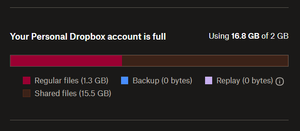

rmhines
4 months agoNew member | Level 2
Thanks to everyone who engaged on this thread. I appreciate the explanations and acknowledge that Dropbox does incur incremental costs when handling shared content.
However, I remain unconvinced that those incremental costs justify the current 100% duplication model. The operational overhead simply doesn't scale linearly with storage usage in the way the pricing suggests.
More practically, this approach creates an unworkable situation: as long as shared folders are pushing me into overage territory, I effectively cannot use my own Dropbox space for anything. And as one member of collaborative groups, I'm not going to start negotiating special arrangements like requesting read-only access – groups don't function well with those kinds of individual demands, and frankly, that's the kind of friction Dropbox should be eliminating, not creating.
When I compare this to alternatives like Google Drive, which only counts shared files against the original uploader's quota, Dropbox simply isn't competitive. Google's approach actually encourages collaboration rather than penalizing it.
Going forward, when colleagues ask "where should we share this?", I'll be recommending Google Drive with clear, data-supported reasoning.
I do appreciate the responsiveness in this community forum – that's a genuine positive for Dropbox. But ultimately, this thread has helped me conclude that Dropbox is no longer a viable option for my use case. It seems like an opportune time for product management to reconsider whether "this is how we've always done it" is still the right approach in today's collaborative work environment.
Best, Rob


About Storage Space
Looking for help with managing the storage space in your Dropbox account? Talk to the Dropbox Community and get advice from members.
The Dropbox Community team is active from Monday to Friday. We try to respond to you as soon as we can, usually within 2 hours.
If you need more help you can view your support options (expected response time for an email or ticket is 24 hours), or contact us on X, Facebook or Instagram.
For more info on available support options for your Dropbox plan, see this article.
If you found the answer to your question in this Community thread, please 'like' the post to say thanks and to let us know it was useful!


